Lead generation is crucial for any business. These articles will teach you how to generate leads online, whether you operate globally, nationally, regionally, locally, or simply over the internet (like me).
Sure, more traffic is likely to mean more conversions, but you might be able to maximize how many conversions you can win eventually by focusing more energy on the leads that come to your online home.
First of all, you should make sure that your website is built and designed in a way that makes it an attractive catch for leads as best as possible.
Specific landing pages and content pages should, for instance, highlight the specific appeals of one product or service, since you’re more likely to catch people with one really good offer rather than by keeping things general and vague.
Tools like A/B testing can help you optimize the website further, seeing which pages lead your visitors closer to either the point of conversion or becoming a lead.
Getting those deets
So, how do you turn a visitor into a lead in the first place? You have to make that first contact and make sure that the door is left open for your sales team to begin their process. Creating lead capture forms might just need the bridging step that you need.
Once you get a visitor’s interest, they may be willing to sign up for more content or for specific offers even if they don’t immediately convert. Keeping lead capture forms simple, clean, and easy to fill in will mean that visitors are much more likely to submit their details.
Systematize the sales process
Once you have their details, then the process of qualifying and building on those leads can begin.
However, rather than having a scattershot approach to how you work on your leads, you can use smart technology to help you act in the most optimal way possible. Sales automation AI can, for instance, help figure out which steps in the lead conversion process work best when, and send immediate alerts to your sales team so that they can strike when the iron is truly hot.
Find the process that best works and make it repeatable so even a new member of the sales team can become an asset quickly.
Target them off-site, too
Even if you don’t immediately hook them, you can get another chance to get them to give you those details and let your sales team do their thing.
Remarketing campaigns on social media platforms, for instance, will specifically target those who have already been to your website and have cookies on their computer detailing as such.
It can another little nudge in the right direction, encouraging them bit by bit over time. If they already like your offer, then the reminder can enough to win them over fully.
Your website can be a highly effective step in your lead gathering and conversion process. However, it’s only one step and you need to have the people and the systems ready to follow up on it. Even a little work in qualifying leads and pushing sales can mean major returns.
In the world of digital business, it is often stated that online traffic is king. In reality, though, web visits count for very little if they do not subsequently become customers. Conversions are the true barometer of online success, and you must not underestimate it for a second.
So, if you’re getting website visitors but not enough sales, now is the time to address this issue. Here are some of the most common reasons, along with how to overcome them.
#1. It’s the wrong traffic
It’s very easy to get caught up in the pursuit of numbers alone. However, if you are attracting clicks from people that will never convert, the figures are redundant. If a butcher’s website only gets traffic from vegetarians, their marketing strategies will not yield a positive ROI.
Understanding your place in the market is essential. It could mean targeting customers from the right financial background, age group, or location. Ultimately, it’s better to get 10,000 hits from people that fall into your demographic than 20,000 from outside audiences.
Accepting the fact that only a small number of brands have universal appeal won’t just boost conversions. It will allow you to target paid ads specifically to those audiences, which will make your budget work far harder too.
#2. The branding isn’t exciting enough
Consumers start to form an opinion of your brand within seconds of interacting with it. Likewise, they will judge your website before they’ve even looked at the content in detail. If your branding elements don’t capture the imagination right away, it will show.
If your brand imagery isn’t in high resolution, it will put some people off. Likewise, you want their eyes to be drawn straight to the most important features. Understanding the importance of above the fold versus below the fold is also crucial. Particularly for landing pages.
The right color scheme and layout won’t necessarily guarantee a sale. Conversely, though, when you set a bad first impression, consumers will take their custom elsewhere. Once they do, it will prove very difficult to win them back.
#3. Your site’s UX isn’t good enough
Consumers are spending more money online than ever before. However, their demand for high-quality customer experiences is also at an all-time high. If a website is slow, hard to navigate, or poorly presented on a device, conversion rates will suffer.
The only way to combat this is to put yourself in the consumer’s shoes to understand their pain points. This remote unmoderated usability testing guide will point you in the right direction. When done right, you’ll know exactly where your site is falling short in no time.
Everyone knows that a good website won’t accomplish anything if your products are inadequate. However, the harsh reality is that the inverse statement is equally true. Use the data to make changes to the framework, loading speeds, and navigation. You won’t regret it.
#4. No urgency
Consumers have always wanted value for money, but they are arguably even more focused on it following the pandemic. Therefore, they will continue to place obstacles between themselves and completing a purchase. Forcing them to make a decision is advised.
Introducing a sense of urgency can be achieved in many ways. Nonetheless, timed promotions are shown to be the most effective. In addition to added value, it establishes the fear of missing out. It is likely to result in far shorter paths to conversion.
The marketing scheme won’t convince every user to buy. However, some of those that resist the temptation will come back at a later date. As for those that don’t, they weren’t likely to become customers anyway.
#5. Payment options are limited
Your online platform is essentially a 24/7 store that is also open to global audience. Sadly, if customers are unable to complete their purchases, your sales will suffer. It would be the same as telling a percentage of customers in a brick-and-mortar store to get out.
Therefore, it is important to choose a suitable payment processing solution. Accepting credit cards, PayPal, and other popular options will give you the best shot at always securing the sale. If your company sells big items, repayment plans can be offered.
The ability to pay off the account over several months may stop you losing a sale at the last hurdle. If you do plan to take this route, though, you must implement credit checking facilities. Otherwise, bad debt could become a problem.
#6. Trust issues circle overhead
Web users are increasingly worried about their data. When some of the biggest companies on the planet fall for cyberattacks, it makes people extra cautious about using SMEs. After all, your cybersecurity facilities are naturally less robust.
Thankfully, it is still possible to master cybersecurity with this guide. Prevention is always the best form of protection against breaches. This is why your entire team must be trained against phishing and ransomware. The vast majority of breaches are from human error.
The concept of promoting trust should not be limited to cybersecurity, though. Making contact details, returns policies, and other data easily accessed is vital. If it looks like you’re trying to hide something, the red flags will wave.
#7. Poor follow-ups
It is suggested that the average person requires seven interactions with the brand to complete a sale. So, you need visitors to check back regularly to gain converted sales. A blog or vlog can give consumers a reason to keep coming back for more.
However, personalization is another key factor. As such, you must do your best to use online forms in an engaging manner. Once a visitor has signed up to newsletters and communications, you can use automated email streams to generate sales. Easy.
The key is to ensure that all communications feel personalized to the user. It could be simple ideas like inputting their name or sending birthday e-greetings. With data-driven insights and analysis, you should be able to tailor the interactions. And predict behavior patterns
The Final Word
Tracking web traffic is still important. But breaking down the barriers that stop them from converting to sales should be the priority at all times. Do not forget it.
Customer relationship management (CRM) software enables your business to manage its interactions and relationships with customers. This can in turn improve processes like marketing, customer service and sales management. Unfortunately, making the switch from a traditional customer management system to CRM is not easy. Here are six tips that can help you make a smooth transition.
Make the CRM Software User-Friendly
The main objective of CRM is to boost efficiency within the company. This means you should always look for a tool that will answer your needs easily whenever you need it to do so. Avoid something that is complex for you and the workers. Instead, go for a tool that is intuitive and practical. The workers should not have a hard time using it.
Understand the Benefits
Many employees will be surprisingly skeptical and afraid to use the new CRM software. One effective way to help them get used to it is by explaining how the software will benefit the company. This involves showing them how it will improve their daily work routines, speed up basic tasks and increase productivity. Make sure you highlight tangible benefits to convince them. For more information on how a CRM can benefit your business, visit https://www.salesforce.com/eu/company/news-press/news/.
Come Up With a Training Program
Organize a session with your staff to teach and help them understand the software. You can use a representative from the vendor or someone who has a lot of experience with CRM tools to train them. Let the person teach them about the features of the software, how to use it as well as how to implement it. He can walk them through the interface of the software and even engage them in a hands-on demonstration. Typically, the staff will learn the basics in one or two sessions.
Update Everyone
You should keep everyone in the company informed about the switch with constant updates. The updates may involve sending weekly newsletters via email to tell them what stage of transition the company is in and what they should expect in the future. You can also hire someone to engage them on a regular basis and help employees who need further assistance.
Look for Feedback
There is no way you can know whether the CRM tool is working if you don’t accept feedback from the employees. Allow the employees to constructively provide feedback, whether they are negative or positive. Doing so will help you know where everyone is and enable you to make decisions on areas that need correction. If you get constant complaints, then you need to take necessary measures to address the challenge before it becomes a major problem.
Test and Change
Lastly, it is very important to use some form of analytics to assess how well the CRM tool is working. This largely depends on the software you are using, but your company must have measurable statistical information to know the progress of the transition. After that, you can know which adjustments you need to make to maximize its usage.
The objective of a CRM software is to streamline business processes, not to create confusion. The tips discussed above will ensure you have a transition devoid of unnecessary complications and work delays.
Today, I’m going to show you how one blog nearly doubledtheir email list in just one week.
You will learn:
The dead simple list building technique that made this campaign go viral.
How to optimize your website to capture email addresses.
The 9 promotion strategies that lead to its success.
It’s a list building case study of epic proportions.
(And almost anyone can follow the exact same steps I’m about to show you to get more email subscribers.)
Let’s jump right in!
Yours FREE: Download the “Viral Giveaway Master Checklist” and take your next list building campaign viral.
The Results
Before we get into how this feat was accomplished, let’s break down the results.
Check out this growth:
The blog managed to convert 3,200 subscribers in just 7 days (457 emails/day).
That’s a 73% increase in subscribers overall.
(The huge spike is from those emails being uploaded to HubSpot.)
But here’s the kicker:
Just one of these tactics contributed to a whopping 2,661 subscribers.
Here’s how:
The List Building Strategy That Took This Campaign Viral
I had been working with this blog for a while, and we were able to gradually grow our email list through social media, referral, and search engine traffic.
(Learn how to drive 34,000 search engine visits in 60 days (for free) in my 5,000-word SEO case study.)
We started off collecting a couple emails per day and eventually got up to a daily rate of 50+.
But that’s nothing compared to the 457 emails/day we got from this strategy.
This campaign went viral for one reason:
A giveaway.
We set up and promoted a product giveaway. People could enter the raffle by submitting their email address, and they could get more entries by referring people using their unique URL.
(Almost like an affiliate link.)
Contestants could share it on social media, email it to friends, promote it in online communities — anywhere on the Internet.
And that they did!
The more people they referred, the higher their chances were to win.
That’s what made this campaign go viral.
We then optimized the rest of the site to capture any runoff traffic that didn’t enter.
It became an extremely high-converting loop.
Who Is This Blogger?
The blog is called UAV Coach, a fast-growing site in the recreational and commercial drone space.
(Which is taking off right now.)
Alan Perlman is the head honcho. He’s a drone enthusiast with a background in digital marketing.
Combining his passion with his marketing skills, Alan is gradually building UAV Coach into one of the top sites in the space.
How We Set Up the Campaign
Normally, setting up a giveaway like this would take complex coding that’s above both of our heads.
Thankfully, there’s a plugin that makes it really easy:
Here’s why it’s important to pick the right prize:
When we did our first contest, we gave away a free ticket to a drone convention in Las Vegas.
It was extremely valuable (which is important), but there were barriers to taking advantage of this prize:
People might not have enough time to go to Vegas.
They may not be able to afford the hotel and travel costs.
They may not like crowds, which come with Las Vegas’ atmosphere.
That campaign converted a little over 400 subscribers.
One of the main reasons our latest one did so well is because literally anyone in our audience could take advantage of the prize.
(I mean, who doesn’t want a free drone? :D)
So consider your prize carefully.
After you’ve chosen a prize, it’s time to set up your campaign, which will be hosted on page like this…
Head into the plugin and create a new giveaway. Then start filling out the description.
Your description should explain the contest completely.
What prize could they win?
How do they enter?
How will the winner be chosen?
How will they receive their prize if they win?
How do they get more chances to win? (<– very important)
Thanks for sharing!
Here’s a description you can use as a template:
Been looking to pick up one of the UAV industry’s hottest new drone models?
You’re in the right place!
In this limited-time raffle, we’re bringing you a ready-to-fly GHOST Aerial Drone from Ehang, valued at $799.
(Note: Big discount over at Value Basket for $469.99)
Ehang just raised $42M in funding and is making waves in the UAV industry. We’re beyond excited that they’re letting us raffle off their GHOST Aerial Drone.
GHOST Aerial Drone (Android Version):
Equipped with a detachable 2D Brushless Camera Mount Gimbal, fit for all GoPro editions and similarly sized cameras.
Easy to fly: one-click commands via your Android smartphone or tablet.
Control height and orientation through the app by sliding bars, and the rest is taken care of.
Wind/Water resistant: moderately windy and rainy weather can’t stop you from flying!
Night mode: LED lights to track drone in the sky
Flight time: an impressive 30 minutes (20 minutes with a gimbal and GoPro attached)
…more specs here.
Is this a brand-spanking new drone?
No, not quite. I may have brought it into the air a couple of times. You know, for testing purposes.
Seriously though, it’s an impressive set of autonomous features, and if you’ve got a GoPro or similarly-sized camera laying around, a fun tool for aerial photography / videography capture. Make sure you have an Android device to fly.
The raffle winner will receive two boxes, one with the quadcopter and its components, the other with the gimbal.
Both boxes are padded and come with clear instructions about how everything fits together. This model is well-structured and ready-to-fly!
Enter the raffle below (and share this offer to increase your chance at winning–details on next page).
Enjoy the rest of the article!
(Hint: KingSumo chooses a winner randomly.)
Then scroll down and choose a start date, end date, and when the prize will be awarded.
I suggest making your giveaway run 7—9 days.
Any less, and you don’t have as much time to promote it. Any more, and you start to lose your scarcity factor.
Next is the rules section (or disclaimer).
It should be pre-populated with default rules. Go through and customize it with your site’s name and anything else you’d like to include.
Then choose how many entries each contestant gets for a referral:
Fill out your prize details in the next section:
Then scroll down and create a question with different answers. This is to minimize spam entries:
(Make the correct answer really obvious.)
Finally, scroll down to the last section and choose an attractive template for your page and any images you’d like to include.
That’s it! Your giveaway is fully set up, and it will start on the date you selected.
KingSumo will store the emails you collect. After the contest, simply download the file and upload it to your email marketing service of choice.
Now, let’s make your giveaway go viral 🙂
Step 1. Build Up Pre-Giveaway Anticipation
There’s nothing like a little pre-promotion to get people excited for your raffle.
First, send a teaser to your current email list, like this:
And this:
This will make sure it’s not a surprise when you send the official launch email. People will start telling their friends/acquaintances about your contest as well.
You can also push out social media teasers at the same time.
Step 2. Optimize Your Website to Capture Emails
Here’s the thing:
Even if people don’t enter your raffle, many of them will still check out your website to see what you’re all about.
This is a prime opportunity to capture some of the runoff traffic from your campaign.
So, just like any traffic generation campaign, make sure your website is optimized to capture emails before driving traffic.
(Freebie: Download chapter 10 of The Content Marketing Guidebook to learn some of the most powerful strategies to build your email list.)
Here’s how to optimize your website:
We used two main methods to capture emails:
Pop-up forms
Content upgrades
These are tried and true techniques to grow your email list.
First, we have a site-wide pop-up form set up:
Which converts at a solid 5.12%. It’s our biggest source of email conversions:
Campaign Conversions: 394 emails (in 7 days)
Next, we have content upgrades set up on our most visited pages.
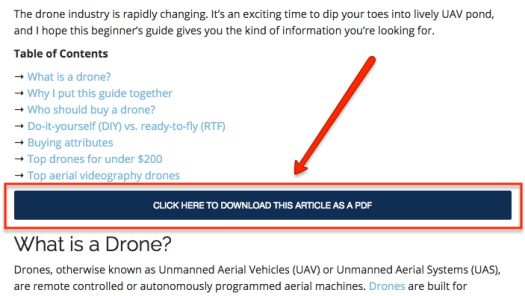
Content upgrades are simply post-specific lead magnets that you deliver through a pop-up lightbox.
Here’s an example:
This lead magnet is just a pdf version of the article. When people click that box, an opt-in form pops up, like so:
When clicked on, this baby converts at 20% to 50%+:
Campaign Conversions: 145 emails (in 7 days)
Finally, we have opt-in forms in both the sidebar and at the end of our posts. These attempt to capture traffic that doesn’t convert through those two forms.
Now that everything is set up, it’s time for the fun part:
This is the official announcement. It’s your job to get people excited about the possibility of winning.
And, most importantly, they need to understand how to get more entries (which helps your giveaway go viral).
The key is to get your audience to help you get other people, who aren’t following you, to enter the raffle and join your list.
So send an email to your list that gets them excited and tells them how to get more entries.
After the initial email, we also published a blog post announcing the giveaway. Our posts automatically get syndicated to other websites and shared on social media, so this helped us attract the initial wave of entries.
And the entries and shares started rolling in…
Step 4. Promote Your Giveaway on Social Media
As we all know:
When things go viral, they go viral on social media.
After your immediate subscribers and followers, this is the natural next place to promote your contest.
First, promote your giveaway on any social media accounts you own.
These could be:
Your Facebook fan page
Your own LinkedIn group
Pinterest Account
Twitter account
Google+ page
Any other accounts you own
After promoting it on your social media accounts, move on to these three communities:
LinkedIn Groups
Google+ Communities
Facebook Groups
These groups are chock full of people who would love a piece of the action.
The best part? It only takes minutes to promote your contest to literally thousands of potential subscribers.
I do this type of promotion for anything and everything related to my blog.
Learn more ways to drive traffic from online communities in my 8,000-word guide to free traffic generation.
Here’s how to expose your contest to thousands of people in minutes:
First, head over to LinkedIn and use the search bar to find groups related to your niche:
Join them and promote your contest.
Next, head over to Google+. Use the left navigation menu to find “Communities.”
Then enter a keyword related to your niche and join as many as you like.
Before promoting your contest, go to your account settings and scroll to the bottom. Make sure “Show your Google+ communities posts on the Posts tab of your Google+ profile” is unchecked.
This will make sure your posts don’t get shared repeatedly on your profile as well.
Then go into each community and announce your giveaway:
Finally, head over to Facebook and search for groups related to your niche:
Join as many as you like and promote your giveaway:
Don’t worry about being considered a spammer or overly-promotional. You’re giving away something of massive value for little in return (on their end).
And they have the freedom to unsubscribe any time if they don’t want to be a part of your list long term.
(Don’t worry, a high percentage will subscribe.)
So be shameless in your promotion.
Then move on to Step 5:
Step 5. Funnel Your Current Traffic to the Giveaway
So far, you’ve promoted the contest to your current subscribers and followers and to thousands of people through social media communities.
That’s huge!
But what about the traffic you’re already getting? How will they know about your giveaway?
Well, you can promote it in your sidebar or on your home page. Those are useful tactics.
But I’ve got a better one:
Funnel people to your giveaway using a header-bar.
What’s a header-bar?
It looks like this:
It’s simply a bar that pops up (like a pop-up form) at the top of your visitors’ screens. You can use them to capture emails, grow your social media following, and much more.
But you’re going to use it to send people to your giveaway.
First, install the free SumoMe plugin. Then install the Smart Bar app.
Go into the app, create a smart bar, and change the “Bar Mode” to “Call to Action.”
Then set the “Call to Action URL” to the URL of your giveaway:
Save it and let it rip!
The bar will start funneling your regular traffic over to the contest.
Our bar sent 304 people to the giveaway who otherwise wouldn’t have known about it.
This was the #1 biggest factor that lead to our giveaway going viral.
Reddit is a massive online community made up of different subreddits. Each one is filled with hundreds or thousands of people enthusiastic about one topic.
We searched Reddit for as many drone and UAV-related subreddits as we could. Then we posted either a text post or a direct link promoting the giveaway.
(Text posts performed WAY better.)
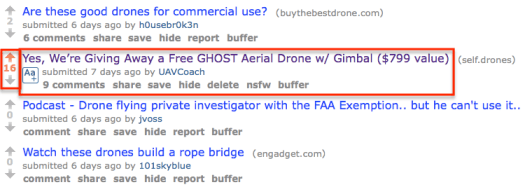
Here’s an example:
That post stayed near the top of this subreddit for the duration of the giveaway. It got exposed to almost 6,000 people for multiple days.
The same thing happened in a few other subreddits:
Here’s how to take advantage of subreddits to promote your giveaway:
First, do a search in Reddit for subreddits related to your niche.
Go into each one and submit either a link or text post. (I suggest text posts, because Redditors trust them more.)
An example:
Which will come out like this:
Then wait for people to check out your post, upvote it, and comment on it.
Make sure to respond to any questions they might have, and you’re all set to drive a ton of potential subscribers for very little work.
Step 7. Forum Promotion
Just like social media communities and subreddits, forums are packed with potential subscribers for you to tap into.
Do a Google search for forums in your niche, join any that are active, and start a thread to promote your raffle.
Remember, you’re giving away something of extreme value. Don’t be ashamed to promote it.
Step 8. Run Facebook Ads
Facebook advertising is one of the best ways to reach a lot of people in a short amount of time.
(Which is exactly what you need to do to maximize subscribers from your giveaway.)
Our Facebook campaign got some FANTASTIC results:
2,327 visitors
931 conversions
A cost-per-click of $0.13
A cost-per-lead of $0.32
Each subscriber only cost us 32 cents!
To put this into perspective, if we had an average subscriber value of just $7, that’s an ROI of over 2,087%
I strongly suggest setting up a Facebook campaign for your giveaway and running it for the duration of the contest.
Create multiple ads with different images, copy, and calls to action. Then pause the poorly performing ads midway through and keep the high performing ads running:
Step 9. A Final Email List Promotion
As your contest starts winding down, you want to pick up any stragglers on your list who might’ve missed your first emails or forgot about the giveaway.
Simply send them an email 48 hours and 10-15 hours before the raffle ends to remind them.
Why Giveaways Are So Powerful
In just 7 days, we were able to increase our entire email list by 73%.
3,200 subscribers is no joke. People wait months to build that kind of an email list.
And we were able to do it in one week by strategically creating and promoting a free giveaway.
So why are they so powerful?
Because you’re giving away something for free that offers a ton of value. And you’re packaging it in a way that takes advantage of the scarcity factor.
This gets people to take action fast.
They don’t have time to wait around, because the clock’s ticking.
Thanks to KingSumo, you also get to add an inherent viral component to the giveaway.
It’s one of the best list building strategies I’ve ever come across.
How You Can Do The Same Thing
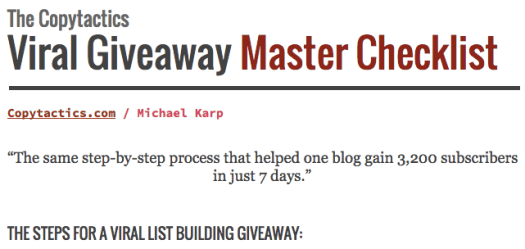
To help you take full advantage of this strategy, I’ve put together a step-by-step “Viral Giveaway Master Checklist.”
This checklist will keep you on track and organized to take full advantage of this strategy’s immense list building power.
Download your “Viral Giveaway Master Checklist” below:
Yours FREE: Download the “Viral Giveaway Master Checklist” and take your next campaign viral.
What do you think are the top list building strategies out there? What do you think of this one?
This 12,000-word tutorial walks you through 13 online lead generation tactics you can use to attract prospects, optimize your website, and capture free website traffic into your marketing funnel.
You’ve been churning out content your audience will love.
You’ve done your research, and there’s a hole in the market that you’re about to fill.
Your content marketing strategy is in place.
Yet nothing is happening.
Email signups are level, and there aren’t any noticeable increases in sales.
Your lead generation tactics are running flat, and it’s almost time to tell your boss or client what results your strategy has gotten them.
OR it’s time to evaluate how your own strategy has been doing.
I’d be freaking out.
But I’d also be puzzled. You’re producing great content, which everyone says is essential. And you’re distributing it in all the right channels.
Yet it’s not accomplishing one of the ultimate goals of every content marketing strategy:
Generating high quality leads that will have a strong chance of turning into happy customers.
Don’t worry.
I put together these lead generation tactics to demystify the path it takes to get these results.
You’ll learn…
How to optimize your site to capture leads
Techniques for attracting high quality, targeted leads
How to use your free content to generate additional leads — without having to lift a finger
And the essential step to maximize your efforts before lead generation
All of this with actionable steps you can follow, right this instant.
Whether you work in marketing or you’re thinking about starting a lead generation business, these tactics will help you get the results you’re looking for.
Yours FREE: Click to download this article as a PDF to take wherever you want on any device.
The Guidelines for Each Lead Generation Tactic
When I set out to write this article, I came up with a few guidelines each tactic must meet.
There’s a lot of information out there, but most of what I’ve found talks about ideas and concepts.
It’s useful information, but I wanted to write an article that can be used as an actionable guide.
I wanted this article to become a “one-stop shop” that can improve your lead generation effortsright now.
Here are those guidelines:
Each tactic must be free to implement, but may have a paid option.
They’re proven and tested tactics to attract targeted leads and capture them (with examples and links to case studies), not just ideas or overall best practices.
They’re simple enough to walk through and implement, for anyone from marketing professionals to first-time bloggers.
Are you ready for this?
Great.
Fire up another tab, and delve into 13 actionable lead generation tactics you can implement right now.
Let’s get started.
Note: Learn how to drive 34,000 search engine visits in 60 days (for free) using cost effective SEO.
In this part, we’ll prepare your site to capture the traffic you’re building.
This is the meatiest section, because without a solid framework to capture leads, the work you’re putting in to generate leads through your content will be futile.
Including all of the work it took to create your content.
Speaking of content, here’s our first tactic.
#1 How to Create Valuable Free Content that Converts Visitors
I believe Jon Morrow coined the term “subscribe bribes,” describing free content that’s given away in exchange for contact information.
Without a valuable asset to entice someone, it’s tough to solicit email addresses and other contact details.
Prospects would have to spend enough time on your site absorbing your content to be inspired (not enticed) to hear from you more often.
Even though this should happen either way — because your content is excellent — people have short attention spans. We need to capture leads as quickly and efficiently as possible before they leave, sometimes never to return.
You have tons of options to offer visitors.
Here are a few:
In-depth eBooks
Free courses
A video series
Access to a membership area filled with content
Free webinars
Templates and ready-made spreadsheets, which help people skip a major step in the planning process
You don’t have to choose just one. Give away multiple pieces of valuable content to cater to different needs.
No matter what you choose, it should be specific to your audience.
Despite these being free giveaways, they need to be extremely high value. They should be worth paying for.
This “bribe” will be an asset that continues to garner returns far into the future.
For people to give up their information (and become leads) the value of your offer must outweigh what they’re giving up.
For instance, on Quicksprout, Neil Patel gives away a 30 day course on generating traffic.
Courses are great. They convey high value information
And once those leads are generated, the length of time helps them become more invested in you.
They’re also nice for building relationships. So if you offer a course, keep the dialogue open by telling participants to contact you if they need anything.
One of HubSpot’s many giveaways is a collection of eBook templates, and it’s even preloaded my information from a previous opt-in.
Copyblogger gives away not one, but 16 eBooks AND a 20-part internet marketing course.
Note: If you’re running a small business make sure you have a stable and reliable internet connection – such as centurylink internet plans.
Copyblogger’s opt-in giveaway
That’s a powerful opt-in right there.
Notice: Each giveaway is high value and targeted to their audience.
Place your free content in accessible areas of your site.
The navigation bar
Home page
The top of each page
Your sidebar
Embedded at the end of posts
Embedded within posts (tactic #2)
And pop-ups (tactic #3)
If you’re struggling to come up with an opt-in, I suggest repurposing your most popular content.
You can repurpose content many ways.
Take your best blog post and make it into an eBook
This is super quick.
Just copy-paste your most popular, highest value blog post into a word document. Format it nicely so it’s easy to read (I usually go with 14-point font).
Then create a cover.
The best free tool I’ve found is Canva. They have preset sizes for book covers, as well as other online images, such as email headers.
Save your document as a PDF and your eBook is finished.
You’ll then want to host it online. I host mine with my email provider, but you can also use something like Dropbox to accomplish the same thing.
Then you need to set up an automatic delivery system once people opt-in. I link it in the “Thank You” email on Mailchimp. But you can also set up a custom “thank you” page on your website with a link to download the eBook, or send it in the “Welcome” email.
Then you’re all set!
Your asset is in place.
Collect multiple posts into an eBook or course
To create an eBook using multiple posts, use the same method as above. Generally, the more content in your giveaway, the higher the value (and the more likely people will opt in).
To create a course, you can distill the most important information into an email autoresponder series. However, this is a paid service.
For a free option, create multiple eBooks that are set up in step-by-step order for people to follow.
Courses are usually engaging experiences, so come up with “homework” to get readers involved and taking action.
Also, keep the line of communication open. Make sure people know they can contact you or someone else for additional help and advice.
Set milestones that people should aim to accomplish after each step, and your course is underway.
You can deliver it the same way you would deliver an eBook. Just make all of them available for download in one automated email or a custom page.
Transcribe the dialogue of a webinar or podcast to create an eBook
Webinars and podcasts are valuable giveaways in and of themselves, but if you already have one made and would like to repurpose it, this is a great option.
If you want to optimize your site to convert traffic, and capture a large number of leads, it’s almost non-negotiable to have some sort of giveaway.
You need something of value to exchange with visitors for permission to contact them further.
That way, you can send them more valuable content. This builds a unique bond between you and your audience, and you can sprinkle your interactions with targeted promotions to convert them into happy customers.
#2 How to Integrate Content Upgrades that Readers Can’t Ignore
Content upgrades allow you to give away valuable, post-specific freebies within your content in exchange for an email address.
Content upgrades are useful because they force the reader to scan over your opt-in.
On the other hand, a visitor may arrive, read your article, and leave without ever looking at your sidebar or making it down to the bottom of your post (where most people place their opt-ins).
(Check out this case study done by Brian Dean at Backlinko, describing how he got a 785% increase in subscribers with just two content upgrades on his site)
Let’s check out some tools to help you generate leads with content upgrades.
SumoMe “Leads” app
I first realized the usefulness of SumoMe in this article by Robbie Richards, where he describes how he grew his email list at a tremendous rate.
SumoMe has tons of cool features and apps, including heat mapping and content analysis software that lets you see how people interact with your site.
Most of their apps are free, but they offer paid ones as well. I would highly recommend checking out SumoMe if you haven’t already.
The Leads app lets you to place a button anywhere in your content. This button allows the reader to download the article they’re reading as a pdf, in exchange for their email address.
SumoMe offers Leads as a free trial first, with the option for a paid subscription.
(If you don’t want to pay, I came up with a free option that can have the same effect. We’ll discuss it at the end of this section.)
First, choose where to place the button, and whether you want it to be small or the full width of the article.
With content upgrades, readers are forced to scan over your opt-in
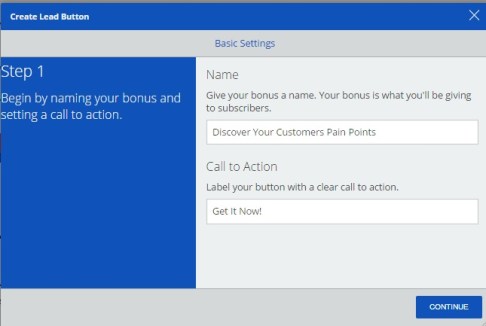
Then, click on the orange button to bring up the following screen.
Create a title and a compelling call to action.
Then, choose the type of upgrade you want your reader to get.
You can choose between a checklist PDF, custom URL, just collecting their email, or a generic PDF.
I went with the generic PDF.
Then upload a logo and grab the HTML from your WordPress editor (or wherever the HTML for your content is located) and input them into SumoMe so it can create the PDF for you.
And you’re good to go!
For those who are looking for a free alternative, I would suggest this…
A completely free option
Create a PDF of the article yourself.
Build a landing page for it. I used LaunchRock (thanks for the heads up, Robbie).
If you would like to download this eBook, click the image. It will open in a new tab, so you won’t lose your place in the article 🙂
Then, simply place links to it within your content at strategic locations – typically half way, one-third, and/or two-thirds of the way through the article, depending on its length.
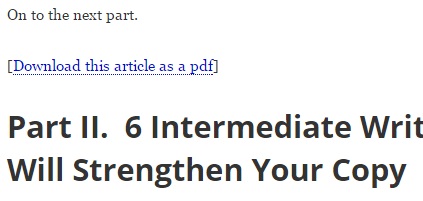
Simple (free) content upgrade link within the article
I place a link at the beginning of the article as well, providing a little more detail about the download.
This lets readers download the article and save it for later, so they can read it offline as well.
It also gives you a chance to connect with your audience through your email list, and potentially gain additional leads through the content you give away (we’ll talk about how to do this in tactic #12).
Offer category-specific opt-ins at the end of your posts
Making your giveaway related to the topic of the post can aid your lead generation efforts.
The logic is simple.
If a reader has been interested enough to read your article all the way through (or they’ve skimmed to the bottom), the individual is primed to want more information on the topic.
Enter your perfectly placed, perfectly timed, category-specific opt-in to save the day.
Let’s check out some examples.
After an article directed towards sales reps, HubSpot places the following non-coincidental opt-in form.
Contently places this opt-in at the end of their posts on content marketing and content strategy.
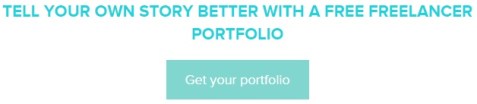
And this one at the end of their freelance articles.
To make this technique even more effective, you could create upgrades that directly enhance the post, such as a template or checklist to help them with the next step of what you’re discussing.
You would link to these upgrades at the end of your article and 1-2 times within your content, to give readers maximum exposure without being too pushy.
If it’s related to the topic, and it’s highly valuable, it shouldn’t come off annoying. It should come off helpful.
Making category-specific opt-ins available for download does mean that you have to create extra content.
But if it will generate more leads, leading to more sales down the line, why not invest more time now to gain additional benefits later?
#3 Increase Conversions by Using Pop-up Forms
Have you noticed how many sites are using pop-up forms?
There’s a reason for that.
Dan Zarrella published this case study analyzing his conversion rate between email pop-ups and not having them.
He saw a noticeable decline in subscriptions when they weren’t active (from 3.08% down to 1.52%) and almost no change in bounce rate (75.66% with pop-up and 75.13% without).
His subscription rate increased with a pop-up form, while there was almost no change in user satisfaction.
Another example:
In this case study, WPBeginner installed a pop-up and increased their daily subscribers from 70-80 per day to 445-470.
PER….DAY….
That’s a 600% increase.
Of course, every website is different. And this doesn’t meant these successes will be replicated for anyone else.
But I suggest giving them a try, and split testing with your own site.
I’ve broken down two pop-up forms for you.
The first is straightforward and pops up in the middle of your screen, and the other offers some more more customizable options.
SumoMe “List Builder” app
I’ve found SumoMe’s List Builder app to be the quickest and easiest form to set up.
It pops up in the center of the screen, and of course, it’s 100% free.
Install the plugin by going to your WordPress dashboard and searching for “SumoMe” in the “Add Plugins” tab.
Then click “Install” and activate the plugin.
You will need to register an account. After that, you’re ready to rock.
All of your SumoMe apps are accessed through a blue tab on the side of your browser, next to your scroll bar.
When you hover over it, it pops out like this.
Click the tab.
A screen will pop up with your settings, notifications, installed apps, and a link to the Sumo Store. For now, the Sumo Store is what we want.
Once you’re in the Sumo Store, install the List Builder app and click “Open.”
Here, you’ll be presented with 5 tabs on the left side.
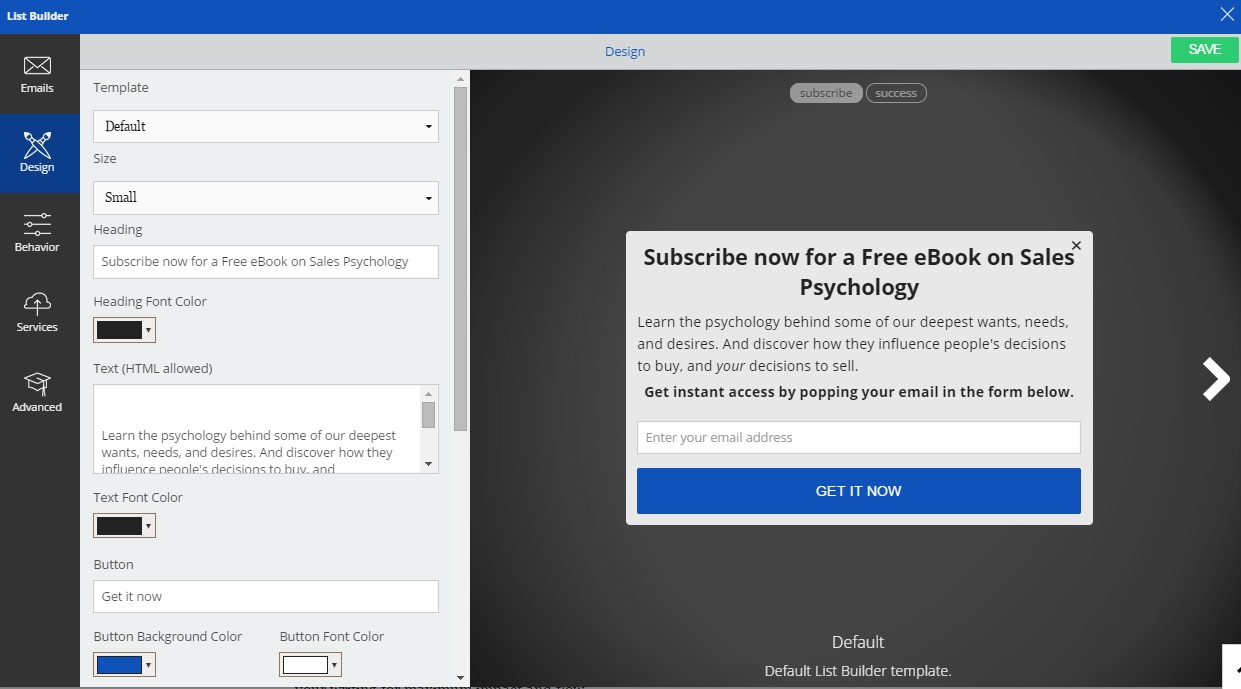
Head over to the “Design” tab.
Fill out all of the information you want. You can also check out mine below for an example.
Click to enlarge in a new tab
A couple things about List Builder:
Test out how the pop-up looks on mobile devices. If it’s too big, sometimes the user won’t be able to scroll to get to your call to action button (BIG DEAL). I’ve had this happen on both iPhone and Android when I included a picture of the eBook. It made the box too long, so I had to remove the image.
Don’t forget to click the green “Save” button at the top right before moving on to another tab. If you don’t, you may lose the work you’ve done on that tab.
Some pieces of HTML you might want to include:
Header tags — <h1>YOUR TEXT</h1> (or h2, h3, h4, h5. Play around and see what looks best.)
Line break — Place </br> where you want to make space before the next paragraph. You might need to use two in a row (</br></br>) to create sufficient space.
Italics — <em>YOUR TEXT</em>.
Bold — <strong>YOUR TEXT</strong>.
Aligning your text — <p style=”text-align: center;”> YOUR TEXT HERE</p>
Of course, you could always use an HTML editor or the WordPress post editor, type in the text, style it how you want, head over to the “text” tab, and then copy-paste the code.
But, it’s always nice to know these things when you’re in a hurry.
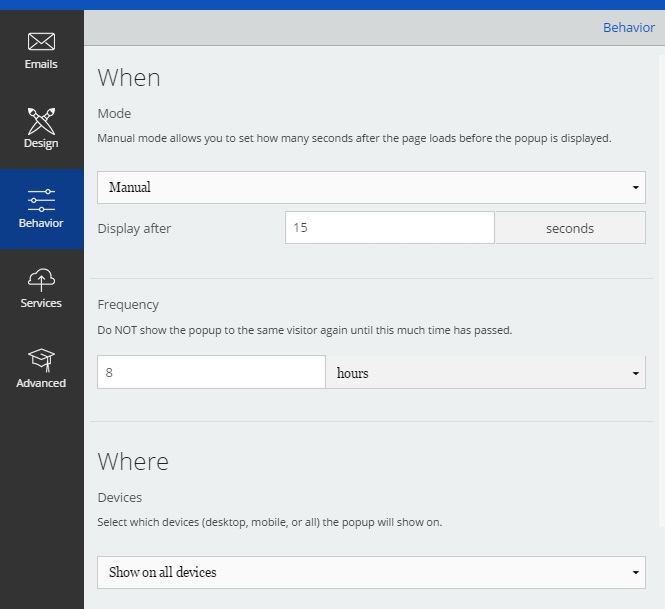
When you have finished designing, click “Save” then head to the “Behavior” tab.
In this tab, we’re going to set the delay time before the form pops up and how often we want to show it to visitors.
Here’s how I’ve got mine set up, but do your own testing and see what works well for you.
Click to enlarge in a new tab
Click “Save” and head over to the “Services” tab.
Connect the app to your email provider.
Finally, the advanced section is for people who want to custom code their own form to use instead.
Pretty nifty if you’re a coder.
I’m not, so I left that tab alone.
That’s it!
You should have a sweet new pop-up form that isn’t too intrusive.
Let’s check out another service with different options.
The Dreamgrow Scroll Triggered Box
This plugin has some cool features, and it’s much less disruptive than most of the pop up plugins out there.
You can choose which area of the screen you want it to pop up, whether it slides in or fades in, which pages it shows up on, how often it pops up, and how far down the page people need to scroll
It’s fully customizable, including the code.
Here’s what it looks like integrated with my Mailchimp embed form.
Let’s install this bad boy and see what cool tricks we can do with it.
(Note: Integration happens by copy-pasting the code of your email provider’s embed form into the plugin’s editor. It works with Mailchimp, but I don’t know about the other providers. Do a quick Google search to check if your provider is supported. If you can embed a code, I don’t see why it wouldn’t work.)
You can install Dreambox straight from your dashboard, or download it here and upload it to WordPress.
Once it’s activated, the plugin will be under the heading “Scrollboxes” on the left side.
Click on “Add New Scrollbox,” and you will be brought to a page that looks like a regular post editor.
Lo and behold, it’s the editor for your new scrollbox.
From there, you have three options:
You can use their default themes. There’s 3 to choose from.
You can custom code your own and replace their code.
You can grab the embed code from your email provider and replace their code.
The quickest and easiest way is to grab the embed code from your email provider.
It’s also the only way I’ve found to directly integrate the scrollbox, meaning that as soon as someone enters their email, they’re on your list and it triggers whatever automated emails you have set up.
If you don’t integrate this way, the email address of each person that signs up gets emailed to you, which can create some hassle manually adding those emails to your list.
(Especially with the amount of emails you’ll capture after reading this article.)
😉
Let’s run through the set up real quick, assuming you’re going to copy-paste your email provider’s embed code.
Grab that code, delete the default code, and paste in your code.
If you want to change the call to action of the subscribe button, look for a piece of code that looks like this:
And change “Subscribe” within value=”Subscribe” to the CTA of your choosing.
Example: value=”Get It Now”
Then head down to the next section.
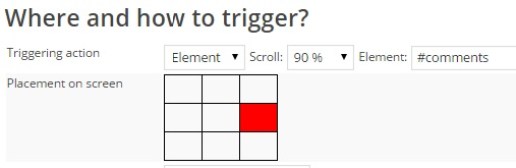
Here, you can decide where you want your form to pop up, how far readers have to scroll, how frequently it will pop up, and on which pages of your site.
Choose where you want the form to pop up.
For the “Triggering action” part, you can choose to have it pop up when people scroll down a certain length or once they hit a certain element on the page (like the comments section).
Scrolling is intuitive, but if you want it to pop up on an element, set it up like this:
“#comments” will trigger the pop at the start of the comments section.
Check out this page for a list of elements to choose from (you’ll need to scroll down a bit).
After that, decide which pages the form will pop up.
I chose posts only, because I have other forms in place for the rest of my pages.
I also disabled the form on mobile devices. When I tested it, the form made entering your email address almost impossible. I asked about it on the support forum, and they said there’s no way around it yet.
But test it for yourself and see how it works.
The next part is extremely important, because it threw me through a loop (despite the solution being so simple).
Check out the section where it says “Where to send default form data?”
If you are NOT integrating your email provider, put your email address in there so it can send you the addresses of people who sign up.
If you ARE integrating your email provider, LEAVE IT BLANK. Otherwise, the form won’t work.
The rest of the settings help you customize aesthetics.
The most important one is the size of your box. 300 px works best for me.
I decided to leave all of my social icons inactive, because when the form pops up, I want people to do one thing and one thing only:
Stick their email address in there and click the button.
(We’ll delve into the theory behind this in tactic #5.)
#4 How to Use Dedicated Landing Pages with Dedicated “Subscribe Bribes” to Capture Guest Post Traffic
This guest post by Noah Kagan adequately sums up the benefits of dedicated landing pages and bribes.
He also employs it nicely with that post.
(Smart guy)
The gist is this:
When you get an opportunity to guest post, try to get as much value as possible out of each post.
How do we define value?
In a lead generation sense, value is determined by clicks to your website that turn into email subscriptions.
Now, this could happen without a dedicated landing page or free giveaway.
For example…
People could click one of the links within your article or a link in your byline, head over to your site, check it out for a bit, decide they want to hear more from you, and then subscribe to your list.
But, as we learned in the section on post-specific giveaways, it’s more effective to create a specialized piece of content for each guest post that is targeted for those readers.
Then, when we combine this targeted content with the conversion power of a landing page, we get a double whammy of Guest Post Lead Generation.
It should also be noted that guest posting isn’t restricted to bloggers.
Companies, corporations, small businesses; any business can benefit from guest posting.
If you’re a company, and you don’t want to guest post as a brand, have one of your staff members post as themselves, but on behalf of your brand by linking back to a landing page on your company website (or wherever you want to send traffic).
Two techniques
Let’s walk through two techniques to generate leads from guest posts.
One is done by most people, and the other by Noah Kagan.
Noah Kagan uses a slightly different technique:
He DOES NOT require people to opt-in to receive his free giveaway.
Check out what he did for a guest post on HubSpot:
(I’m already a subscriber. Otherwise, it would have worked on me.)
He leaves it up to the individual to make their own decision about whether they want to hear more about his growth tactics.
They’re not forced to give away their information first.
By doing it willingly, I would assume this method converts gets higher quality subscribers, but less volume.
I also think, by requiring the opt-in, people don’t lose a significant amount of those higher quality subscribers.
And they may even convert the lower quality subscribers into devoted followers, once these followers engage with their content through email.
Then again, I’m not Noah Kagan.
Here’s another example. This time from Ramit Sethi.
Readers got funneled to this landing page from a guest appearance on Tim Ferriss’ podcast.
Different type of content.
Same effect.
But in this case, Ramit decided to require visitors to opt-in to join his free mini-course.
It also became an avenue for Ramit to promote his upcoming paid course.
He got two benefits out of this:
Targeted subscribers who are interested in what he has to say, because they listened to the podcast
Direct leads to promote his product
With your next guest post (or guest appearance), split test requiring readers to opt-in versus not requiring it, and see which performs best.
Then write up a case study so we can all learn from it.
Thanks.
The point is…
You should always have a dedicated landing page and bribe in place to maximize the returns from each guest post.
It takes slightly longer to put together, but it could send you high quality, targeted leads for a the life of the post.
#5 Cut Down the Choices People Have on Your Lead-Generating Pages
“The time it takes to make a decision increases proportionally to the number and complexity of choices” – Usability.gov
This is the definition for Hick’s law, or the Hick-Hyman law.
In terms of conversion rate optimization, the fewer options you give a visitor, the faster they’ll make a decision. (click to tweet this epic quote)
And if you only give them one decision (signing up for your list), they have a much higher likelihood of making the decision you want them to.
I first heard about this law in an article on Unbounce.
It cites a case study done by Marvin Russell of MySiteAuditor, in which they decreased the number of choices on their free trial sign up page from 13 options to 1 (filling out the form) and increased conversions by over 25%.
The article also cites a quote from the CEO of Groove, who said they simplified their sign up form and increased conversions by over 30%.
Additional choices increase the time it takes for your visitors to make a decision.
When generating leads, you want them to make your desired decision as fast as possible with minimal distractions.
The more options they have, the more likely they’ll choose not to give you their contact information.
This is why you’ll come across sign up pages with no header, no footer, and one form with one call to action.
Doing this minimizes the number of choices people can make, it forces them to zero in on the choice you want them to make, and increases the likelihood of them making this choice.
This is a simple lead generation tactic that can make a substantial improvement in your lead conversion rate.
An example
I love James Clear’s website. And his blog in general.
It’s clean, it’s simple, and it’s…well…clear.
Check out his header.
And his footer.
Does he have a sidebar?
Nope.
Does he have 15 social share icons?
Nope.
He has limited his site to what people need to know, and nothing more.
If they want to learn more about him – one click.
If they want to read his articles – another click.
If they want to check out his books, photography, or contact him, there’s a few more.
And he’s got a link to his newsletter that stands out above everything else.
(I actually borrowed the layout for my home page from him, because I love its simplicity.)
Can you guess how many subscribers he has?
100,000 subscribers, to a site with much less clutter than most. Connection?
Also, the sign up page for his newsletter has one choice.
Signing up.
No header.
No footer.
Nothing else.
The bottom line
Want more leads?
Cut down the number of choices people have on your lead generating pages.
Then split test.
Yours FREE: Click to download this article as a PDF to take wherever you want on any device.
#6 How to Capture Leads Using Gated Videos
An opt-in “gate” requires the user to submit their email address to gain access to a piece of content, or sometimes to an entire website (like Jon Morrow’s).
If you’ve been contemplating how to get more value out of your videos, try installing a gate to capture leads.
Most services give you the option of requiring an opt-in at the beginning, end, or in the middle (once the viewer is invested in the video).
Gears should be moving inside your head.
This is powerful stuff.
Check out these two examples.
Matthew Woodward is an SEO expert who creates tons of high quality video tutorials.
Most (if not all) of his videos are gated.
You can skip the opt-in if you wish, which is gracious of him. Most I’ve seen don’t let you do this.
Brian Dean teases you with four minutes of his video on how to rank for any keyword (a massive tease) before prompting you to opt-in to his email list.
(P.S. This is how he got me.)
Getting excited?
Are those gears moving?
Good.
Most of the tools to create gated videos are paid.
In keeping with the free guideline of this article, let’s check out a tool to help you create gated videos that won’t break the bank.
(I’ll throw in a link to a popular paid one afterwards)
Note: If you’re not planning on creating gated videos, or you just want to see the paid option, click here to skip down the page.
ShortStack
ShortStack is a versatile tool used for campaign-building.
You can create promotional campaigns, quizzes, voting sessions, Instagram promotions, photo promotions, contests; almost anything you can think of to engage an audience by promoting content.
Like most of these types of services, ShortStack offers paid and free features.
Their free features are more than enough to create a gated video.
However, you won’t be able to host it on your own site or with a custom URL.
But you can still make one. And it works well.
(Note: As of the writing of this article, ShortStack only integrates with Mailchimp. If you don’t use Mailchimp, I have included a work around option when we get to the integration step.)
First, go to their home page and click “Start Creating Free Campaigns.”
You will be prompted to sign up.
Create an account.
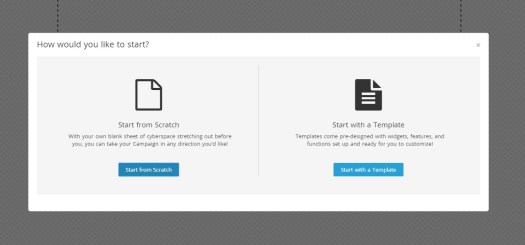
You will then be taken to this page:
Click on “Start with a Template.” This will make your life much easier.
Then, go up to the search box at the top-right.
Type “video” and click “Search.”
Find the template that’s called “Super Video Tab.”
That’s the one we’re going to use, so give it a nice, solid click.
Then click the orange “Make Campaign” button.
You will be taken to the main screen where we’ll edit your page.
Each box is called a “widget,” and we can edit and move them around to do our bidding.
The first thing you should do is delete the “Template Instructions” widget.
You don’t need that, because that’s what I’m here for.
Delete it by hovering over with your cursor and clicking on the trashcan symbol in the top-right corner.
The page will reload and it should be gone.
Now we’re going to add our sign up form.
Our “gate.”
Like I mentioned in the beginning, ShortStack only integrates with Mailchimp.
However, here’s the work around:
If you don’t use Mailchimp, I suggest making an account to collect leads from your videos, then transferring the list over to whatever email provider you use.
To keep this tactic free, you can gather your first 2000 addresses with Mailchimp at no charge. If you end up hitting that number, just transfer those leads to your main list and delete the addresses on your Mailchimp list. Then you can continue adding to it for free.
That should do the trick.
(However, don’t quote me on that, because I haven’t tried it myself. Experiment with a couple addresses first before setting up your video.)
Back to creating our gated video.
On the left side of the widgets, you’ll see a long panel with tiny squares for tools and such.
That’s where our sign up form is.
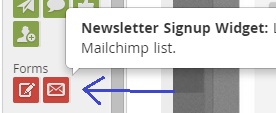
Look for the “Forms” heading and click on the symbol with the letter. It looks like this:
That should bring up a form to enter your Mailchimp API key.
If you don’t know where to get your key, log in to your Mailchimp account.
Click on “Account.” Then click on the “Extras” drop-down menu. API keys should be your first choice.
Click on it, generate a new key if you like, and copy-paste that key into the box in ShortStack.
Once you do that, Step 2 will magically appear below, allowing you to choose which list you want people to sign up to.
Next, use the left navigation to click on “Options.”
Where it says “Send This Notice to New Subscribers,” I suggest choosing “Double Opt-in Confirmation.”
After that, give your viewers some instructions on how to play the video.
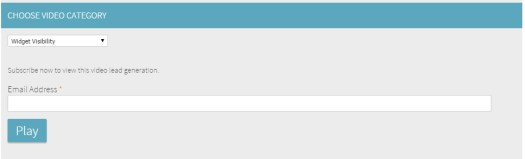
In the box that says “Instructions to User” type something along the lines of “Subscribe now to view this video on lead generation.”
Then, use the left navigation and click on “Text.”
It will look like this:
Your text should compel people to sign up.
In the row that says “Submit,” write a new call to action under the heading that says “Display This Instead.”
I chose “Play” so the viewer knows once they enter their email they’ll get to play the video.
You can edit the other parts to your liking, depending on how you’re going to frame the sign up.
Leave the rest of the settings as they are.
Click the orange “Save & Exit” button.
You should be taken back to the widgets screen, and you should have a new widget with your sign up form that looks like this:
I clicked and dragged the widget to position it above the video, but below the categories widget.
Next, we’re going to integrate the video we want to show.
ShortStack supports Youtube and Vimeo, so it should cater to almost everyone’s needs.
To integrate a video, head to the long panel on the left and look for the “Integrations” tab.
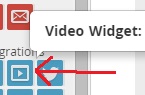
Then, look for the icon that has a little play button. That’s the one we want.
Give it a nice, firm click.
A screen will pop up for you to enter the URL of your video.
Grab the URL and stick it in there.
Next, head down to the “Sharing” tab on the left and create a label for your share buttons. I would also select “Use Image from Share Widget.”
IMPORTANT: Do not adjust the visibility settings. You can play around with the other settings, but we need these to stay as they are. You’ll see why in a bit.
Click on “Save & Exit” when you’re ready.
At this point, you may or may not see your video on the widget screen.
If you don’t, that’s okay. We’re going to delete their default videos.
At the very top of the screen, find the symbol that looks like three pages stacked in front of each other.
It should say “Edit Widgets Panel” when you hover over it.
Click on that symbol.
(This panel may already be open for you.)
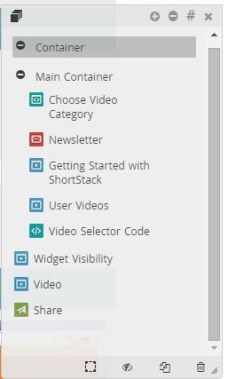
It should look something like this:
We’re going to rearrange these widgets, adjust the visibility of one of them, and then we’re almost finished.
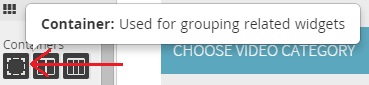
If you don’t have a “Container” widget already, head over to the left panel and find the symbol below. Then click on it.
It should have been added to your widgets panel, possibly under the “Main Container” heading.
We want the regular Container we just added to be by itself, so it’s not under anything else.
Simply click, drag, and drop it at the top.
Next, we need to put your YouTube or Vimeo video under the Container header we just moved.
Your YouTube video should be named “Video” by default and have a blue symbol next to it.
Click, drag, and drop it under the Container heading so it sits slightly aligned to the right.
This means that however we edit the Container widget, it will do the same thing to our YouTube video.
Now, let’s delete ShortStack’s default videos.
Click on each video to select it. Then use the trashcan symbol in the bottom right of the panel to delete.
You should end up with something that looks like this:
Next, we’re going to change the visibility settings of the “Container” widget, so that it’s hidden when the page loads.
Then, we’re going to set up an action that shows the video once the user submits their email address.
Hover over the Container widget within the panel and click on the eyeball symbol.
This will bring up the visibility settings.
Where it says “Display State” choose the option that says “Starts Hidden.”
Leave everything else as is and click “Save & Exit.”
The video shouldn’t be displayed on your widget screen anymore.
And next…
We’re on to our final step before publishing.
Here, we’re going to tell ShortStack to only show the video once the user submits their information.
On the long panel, find the tab at the bottom that says “Advanced.”
The first symbol should be an arrow called the “Action Widget.” This lets us do an “If this, then that” type of proxy.
Click on it.
It will bring up this screen.
Where it says “in” next to the box, use the pull-down menu to bring up “Newsletter.”
Then make sure the box to the right says “the form is submitted.”
Then click “Add Action” to bring up another form.
In the first drop-down menu, select “Container” and in the one next to it select “Show.”
Now, after someone submits their info into the newsletter widget, it will show what’s in the container widget (AKA your video).
That’s our gate!
Click “Save & Exit.”
Finally, head up to the top-right of your screen and click “Publish Campaign.”
Ignore all the stuff about upgrading.
Click on the hyperlink “Publish to the Web only.”
Again, ignore all the stuff about upgrading, and click “Try it Free” in the bottom-right corner.
It should say your campaign is live and provide you with a URL for your page.
Grab that link and copy-paste it into another tab.
Your page should show up without the video.
Test out your form by submitting your email address.
Then your video should appear.
There’s your gated video!
Lastly, head over to your email account and make sure whatever automated emails you have in place got sent over.
If they did, you’re good to go.
And if you hate the link for your new page, you can use a plugin like Pretty Link to make a custom one using your domain.
I know that was a long process, and I’m sure there are more efficient free options out there.
So if you know of any, please tell me in the comments.
For a paid option, I’ve heard Turnstile from Wistia works well.
The gist
Gated videos can be extremely powerful ways to capture leads, and now you have some options to choose from.
#7 Twitter Lead Generation Cards
I was stoked when I found out about these.
Twitter Lead Generation Cards allow you to attach a sign up form to any Tweet, with a call to action and an image, so people can sign up to your list without ever leaving Twitter (if you choose).
When people sign up, you will receive their information, including their email address and Twitter handle.
And these cards are free to use, as long as you completely set up your Twitter “Ads” account.
First, head over to your Twitter home page.
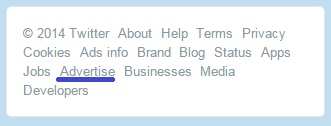
Then look for the “Advertise” link in the bottom-left module below “Trends”.
Click it and you will be taken to the Twitter Ads section.
If you haven’t used it before, you’ll be prompted to set up your account by filling in your country and time zone information.
This is normal information for social media advertising, and if you want to use Twitter Lead Gen cards for free, you must complete the process (which will include billing info. You will not be billed unless you run a campaign.)
Fill this information out and click “Permanently save these settings”.
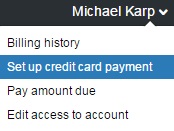
Next, head up to where it says your name in the header. There should be a drop down menu.
Click on your name to bring up the menu, and click on “Set Up Credit Card Payment” to fill in your billing information.
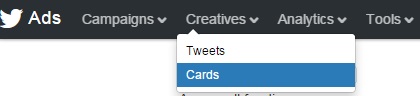
Once you have submitted your information, you should see new options in your header, like this:
The one we want is “Creatives”. Click on it to expose a drop-down menu. Then, click on “Cards”.
Click on “Create your first Lead Generation Card”.
You will arrive at a page to input all of the necessary information to create your card.
Fill in the information.
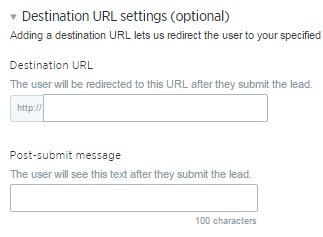
If you’re sending prospects to a landing page to sign up, don’t forget to input the destination URL.
When you’re done, create your card.
Then click on the blue symbol in the top-right corner of the screen to compose a new tweet.
You should now have an option to attach a card to your tweet.
You can choose between a standard or promoted tweet.
Standard sends it to your followers, and it’s free. Promoted sends it to a targeted audience, and it’s paid.
Compose your tweet, attach your card, and fire away!
#8 Harness the Power of Slideshare Presentations
SlideShare allows you to upload PowerPoint presentations, Word documents, and PDFs to share publically or privately.
It’s becoming more popular for people to share, engage with, and promote interesting content.
These presentations can be shared, embedded, “liked,” or saved to your computer.
Google seems to like them, and people are generating solid traffic and leads from their presentations, like this person, this company, and this person.
Here are the important parts:
You can include URLs back to your landing pages within the description.
You can include live links within the presentation with specific CTAs.
With the paid option, you can include opt-in forms within the presentation.
This article on HubSpot does a good job of explaining how to get the most out of each presentation, but I’m going to walk you through how to set it up, and the options you have to funnel traffic and generate leads.
Setting up and launching a SlideShare presentation
First, create an account and head over to your account settings.
From there, connect it to your social profiles.
Go through and sort out the rest of your settings as well.
I changed up the privacy settings and my contact details.
Next, create a presentation to upload.
Of course, you can upload PDFs and Word documents as well, but they come out as the full document in a presentation format (which isn’t appealing, in my opinion).
Leave some room for desire, so if you’re creating a presentation around a free giveaway, summarize the giveaway with slides, then prompt viewers to head over to your landing page to download the full piece of content.
PowerPoint (or whatever software you have) will do the trick. You can also download Open Office for free. It comes with presentation software.
Here’s a link to my presentation, if you want to see how I did it.
I took this article/eBook, condensed it down to information-rich bullet points, and made it into a presentation.
Some tips before you create your presentation:
Make your presentation 800X600 (or 10.67in by 8in) to fit in the SlideShare screen with no black edges. (Thank you, Ana Hoffman.)
Include clickable links and images (with CTAs) in your PowerPoint presentations. Make sure your links are in the center of the slides, because SlideShare reserves the left and right areas for people to click forward and backward in the presentation. This HubSpot article notes that if you put your links on the sides, they won’t work. Keep them in the middle part.
SlideShare doesn’t allow links in the first three slides, so put them on the fourth slide and beyond.
You can’t include live links in the description, so paste your URL in there with a call to action.
To maximize view potential, this article says to upload your presentations at 11PM EST (8PM PT). This way, it’s uploaded it right after SlideShare changes its Top Presentation of the Day, and you have 20 or so hours to collect views and hopefully get featured.
Include clickable social icons on the last slide to share your presentation.
Google can crawl the transcript that’s displayed below your presentation, so optimize your presentation like you would any other page or blog post. Keywords in the title, headlines, description, slug, etc.
HubSpot says to disable SlideShare’s option for viewers to download your presentation as a PDF. That way, their only option to get more information is to follow the CTA to your opt-in form (or even to a “Pay With a Tweet” page). Basically, you want them to go somewhere you can get value out of the download as well, even if you’re just offering the presentation slides.
Ana Hoffman also notes that you can re-upload your presentations if you notice a spelling mistake, want to change your CTA, or make any other changes. You won’t lose your views, settings, etc.
Once your presentation is ready to go, here’s how to upload it:
Click “Upload” in the top-right corner of your screen.
You will be brought to a page where you can choose to either upload a file, or create a presentation or a professional journey.
Click the big orange Upload button, and select your file to upload.
It will bring you to a page where you can input your details. Here’s where we’re going to do some optimization.
Click to enlarge in a new tab
You can customize your title how you like. Throw your main keyword in there.
Then choose a category. Make sure it’s related to your video.
In the description, make it compelling for the viewer, with your main keyword included.
Include the URL of the landing page (or wherever you want them to go) to opt-in to your email list.
Choose tags related to the keywords you want associated with your presentation.
Then make sure it’s “Public.”
(Sidenote: Your “Virality Score” should have a full bar now. So if your presentation doesn’t go viral, you can sue them.
Either way, it’s a win-win.)
Click “Save & Continue.”
You will be taken to the second step, where you receive your embed code and share options.
Click on “Advanced Settings.” You should be taken to the privacy settings page.
Switch the “Allow users to download?” setting to “No”.
This means viewers won’t be able to download your presentation directly from SlideShare.
Remember Hick’s law?
We want to give prospects less options, while pointing them to the desired action we want them to take (opting in to your email list).
Click “Update”.
And you’re good to go!
Share your presentation, especially in related groups you’re a part of on LinkedIn.
I suggest sharing it on StumbleUpon as well, because it has massive viral potential for content like this.
Part II. Techniques for Attracting Targeted Leads
We’re going to use social media as a tool to reach a large number of targeted prospects.
Don’t worry, I won’t be telling you stuff like “post 5 times a day and follow a bunch of influencers.”
We’re going in-depth and actionable, especially with Twitter.
#9 LinkedIn Tactics for Targeted Traffic
LinkedIn is prime real estate for lead generation opportunities.
It’s literally made to connect professionals with other professionals.
Neil Patel makes at least $250,000 per year from LinkedIn-generated business, so the opportunity is there.
Lead generation on LinkedIn through content marketing employs the same principles as content marketing in general.
Figure out what your target audience wants, needs, and craves from you.
Create amazingly useful content that caters to those needs.
Find where they hang out on the Internet (or on LinkedIn).
Promote your content to build authority and display your expertise.
Attract traffic to your site and let the lead capturing tactics you employed in Part One do the rest of the work for you.
I’m going to assume you already know what your audience wants and how to create great content.
(If not, I’ll have articles on those subjects coming up in the near future.)
So, let’s start with finding where your audience hangs out on LinkedIn.
Go to LinkedIn, and in the top search bar, click the drop-down menu and select “Groups”.
Then search for your industry.
Join groups with a sizable number of people.
You can join around 50 groups maximum.
However, don’t join 50 groups in your industry alone.
Join groups in related fields – where your potential leads would reside.
Other professionals in your industry may enjoy your content, but they most likely don’t need your services. They’re not targeted leads.
Think about your target market. The people who want what you offer.
For me, I have joined content marketing groups, SEO groups, email marketing groups, etc.
But I have also joined groups of start-ups, entrepreneurs, small businesses, and internet entrepreneurs.
Next, post content in these groups just like you would on Twitter, Facebook, Google Plus, or any other social network – with a mix of your own content and valuable content from other people. You should also answer questions and contribute your expert wisdom in discussions, just like a forum.
If you know it’s content people will love, then not promoting it is actually doing them a disservice.
You’re depriving them of valuable information that could help their business, their life, or both.
We may be able to hide behind our computer screens, but the Internet isn’t for shy people.
Get yourself out there and attract those leads, like your business depends on it.
(Because it does.)
Being active in groups is great, but it’s a long-term strategy.
Let’s check out a more direct tactic.
In this PDF from HubSpot, they discuss a way to generate leads through your connections at a specific company.
Think about a company with people you want to target.
Head over to the search bar and type in the name of that company.
Click on the company.
You’ll see a “How You’re Connected” tab on the right. Click on “See all.”
This will show you the staff members with whom you are connected, and how you’re connected to them.
If you can’t connect with them directly, click on their name.
This will bring up their profile.
On the right side, you will see which connections you share.
These shared connections allow you to request a virtual introduction to the person you wish to get in touch with.
After being introduced, you’re off to the races.
Use your people and business skills to close those leads.
Another tactic
Robbie Richards has an interesting technique to connect with influencers.
If you’re in the same group as someone, and you share a connection, you can send them a connection request without knowing their email address.
So if there’s an influencer you want to connect with (or anyone in general) head over to their profile and see which groups they’re a part of.
Join one of those groups and send them a connection request.
In your request, don’t leave the default “I would like you to join my network” message.
Make it personal, but professional. Maybe even state that you wish to discuss a business opportunity.
If they accept, you now have a direct line to their inbox.
There’s your lead.
Robbie Richards also notes that in any group you’re in, you can do a search for someone’s title, such as “CEO,” and pull up a list of the people in the group with that title.
Then you can then connect with them using the same technique above.
One more tactic to generate leads with LinkedIn
Another way to generate leads with LinkedIn is to use the “Who’s Viewed Your Profile” module.
People who have checked you out (hummina hummina) are usually interested in what you do and are in a related industry.
Click over to their profile, send them a message, and ask if there’s anything you can do for them.
You never know what opportunities could arise from reaching out like this, and it’s takes about two minutes.
Yours FREE: Click to download this article as a PDF to take wherever you want on any device.
#10 How to Generate a Master List of High Quality Leads Using Followerwonk
Followerwonk is a Moz tool that allows you to analyze your Twitter followers.
We’re going to use it to segment your followers into highly targeted potential leads to contact.
By the time you’re done, you’ll own a master list of your direct target market. These are people who are already interested in you AND likely to need your services.
Not only this, but you can use this lead generation tactic to analyze and segment your competition’s followers as well (or anyone who’s followed by your target market).
Kathryn Cudemo wrote an epic post on using Followerwonk to find prospects. It should have more shares than it does, so I would check it out as well (and give it a share).
I’m going to extrapolate her steps here, with a more content marketing focused approach and in a little more detail (because I hit some kinks along the way when I first did it).
Let’s put those followers to good use, shall we?
Analyze Your Followers (Or Your Competition’s)
Head over to Followerwonk and sign in with your Twitter account.
Then click “Analyze” at the top.
Type your Twitter handle in the form, and select “analyze their followers” from the drop-down menu.
Then click “Do it.”
This will pull up some pretty cool data, including where your followers are located in the world and when your followers are most active during the day.
They’ve even integrated with Buffer to automatically create a tweet schedule for you that’s optimized based on when your followers are most active.
Next, we’re going to download a CSV or Excel file of your followers so we can filter the data.
To download this file, you need a paid Moz subscription (which I don’t have), but they do offer a 30-day free trial.
I would highly recommend signing up for the trial, because going through this process just once should give you more than enough targeted prospects to keep you busy for a while.
This includes prospects for clients, joint ventures, guest posts, customers, etc.
Once you’re signed up for the free trial, link your Moz account and you’ll be able to download the CSV file.
To do that, follow these steps:
Find where it displays your sample size of followers under the heading “Analysis of YOUR HANDLE’s Twitter followers”.
Click “view all.”
A window should pop up with your followers and some data.
Click the symbol in the screenshot below to download your CSV or XLS file.
It may take some time to generate, depending on the size of your following.
Open your report, and add three columns to the right of the URL column – “DA”, “Status Code”, and “Linking Yes/No.”
Select all of the data and format it as a table.
Filtering Your Followers to Get to the Good Stuff
First, we’re going to delete all of your followers without a URL linked to their profile.
(Make sure you’ve saved a separate file with the original data, just in case.)
Select all of the data again, right click, and click on “sort” >> “custom sort.”
In the Sort By column, choose URL. In the Sort On column, choose Values, and in the Order column, choose A to Z, like this:
Close the window and all of your followers without a URL in their profile should be at the top of the list.
Select all of them.
Delete them.
You should be left with followers who have URLs in their profiles.
Next, we’re going to filter out social sites.
Go to the URL column and click the symbol next to it.
Next, use the following list (provided by Kathryn) to filter out each social site.
Facebook
Fb.
Twitter
LinkedIn
Linkd.in
Youtube
Instagram
Pinterest
Google
Gplus
Goo.gl
Yahoo
Amazon
Ask.
Myspace
Flickr
iTunes
Vimeo
IMDB
Wikpedia
Wiki
Apple
About.me
Etsy
Flavors
Zazzle
Vizify
Soundcloud
Fiverr
Wefollow
Eventbrite
Meetup
Forum
Kathryn lists these as optional, depending on your goals:
Tumblr
WordPress
Blogger
Wix
Type each site into the search box, one by one.
Uncheck the box that says “Select all search results” and check the box that says “Add current selection to filter”.
Then click “Ok”.
These social sites should be removed from the list, further narrowing it down to your target audience.
(I know it seems like it would take a while, but it only takes a couple minutes.)
Next, we’re going to filter out your followers who haven’t tweeted recently, thereby filtering out the people who are inactive.
Go to the “Last tweet” column and click that symbol again.
Then sort it by “Oldest to newest.”
Head over to the “Tweets” column. Sort it from “smallest to largest” and create a custom filter to include all of your followers who have made less than 200 tweets total (or choose a threshold based on the amount of followers you have).
Delete these followers, so you can get rid of people who aren’t active.
Then click on the symbol in the tweets column and check the “select all” box to bring back the rest of your followers.
Go to your “Last tweet” column and remove all of the followers who haven’t tweeted in the last 6 months.
That’s gets rid of more people who are inactive.
Next, we want to filter our list by domain authority.
Grab this free tool from Netpeak. It will allow you to do a mass analysis of URLs to determine their domain authority.
Once you have installed the program, uncheck everything in the “Parameters” module using the X symbol, and check only “moz.com” >> “Moz Domain Authority”.
Then copy all of the URLs in the URL column of your spreadsheet.
(Note: in order for it to copy correctly, you may have to select the cells, click the big “Filter” button under the Design tab to un-filter it, copy them, and then press undo to bring your filtered data back.)
Go to Netpeak Checker and click “Load” in the top-left.
An editor will pop up. Paste your URLs in there and click “Save”.
Then click “Start Check” and it will analyze each domain.
When it’s done, export your file and copy-paste those domain authorities into the “DA” column of your spreadsheet.
(If you get an error that says “command cannot be used on multiple selections” when you try to paste, just paste your Domain Authority data into a notepad or text editor. Then copy-paste those DAs into the spreadsheet.)
Next, sort the DA column by “smallest to largest”.
Choose a domain authority threshold (based on my data, I chose 25) and delete all of the domains that have a lower level of authority than your threshold.
Next, take the remaining URLs and input them into the HTTP Status Code Checker so we can filter out domains that aren’t active.
Paste the status codes into your spreadsheet, and delete the followers with 400 and 500 codes.
You can also use a tool like Open Site Explorer to see if they’re linking to you, then place that data in the “Linking? Yes/No” column.
That’s it!
You should have a solid list of highly targeted prospects who are already interested in what you’re doing, they’re active, their sites work, and they’re waiting for a lucrative business opportunity to come knocking on their door.
After this, I would suggest milking that 30-day free trial for all it’s worth.
Repeat this process to analyze your competitors, and Twitter accounts that are being followed by your target market.
Use this tactic to create a master list of high quality prospects. Then reach out to them.
(I want to give a HUGE shoutout to Kathryn Cudemo for writing her amazing article. If any of this didn’t make sense, check out what she wrote.)
#11 Google+ Tactics With Your Content as a Lead Magnet
Using Google+ to generate leads is similar to using LinkedIn to generate leads.
Your main source of traffic is going to come from Google+ communities.
Much like LinkedIn groups, some are open to join and some you must be accepted.
Either way, join a bunch of them that are related to both your industry and to your target market.
Once you have joined some communities, become active in a select few that have the highest likelihood of driving targeted traffic to your site.
And whenever you post your own content on Google+, make sure you link it to a targeted community as well.
And throw a relevant hashtag in there to help it reach more people.
If you have mentioned prominent people in your article, tag them to send them a notification.
Hopefully they’ll respond with a +1, which will expose your content to their followers.
Part III. Optimizing Free Giveaways to Maximize the Viral Value of Each Lead
In this part, you’ll learn how to turn your free, lead-generating content into a viral lead magnet.
We’re going to take your content, employ some social sharing tactics, and give each piece a chance to generate additional leads without you having to lift a finger.
#12 How to Optimize Your Subscribe Bribes to Generate Additional Leads
Your free giveaways are already aiding your lead generation efforts in a monumental way.
But their value doesn’t have to stop after someone downloads them.
They can help generate additional leads while your content is being consumed.
Here are a couple ways to make this happen:
Click to Tweet
You’ve seen my “click to tweet this epic quote” links a couple times in this article.
(And hopefully, you clicked ‘em :D)
If you haven’t used this before, it’s a great way to get more engagement and social sharing from your content.
The service is called Click to Tweet, and it allows you to craft a ready-made headline for anyone who clicks to share it.
A window automatically pops up with a tweet ready to go. All they have to do is tweet it.
It seems simple enough, but there are a couple caveats to consider.
Then find the section where you can create a basic tweet for free.
Now, this is key.
For whatever reason, the 140 character limit in CTT doesn’t match up with the 140 character limit in Twitter.
0 characters left in Click to Tweet
Over the limit by 2 in Twitter
CTT overshoots it by 2 characters (in this test), so make sure you test it out before you link it within your content. It’s been off by around 6 before.
The best thing to combat this: Write the full tweet in Twitter then copy-paste it into CTT.
The link it generates can be used like any other URL.
Adding it to your free giveaways provides many benefits.
You give people a quick and easy way to share your content
This exposes your content to their followers
You get to decide what’s in the tweet. It’s customizable, so readers can change it if they wish. But most people are too lazy (which works in your favor).
In your ready-made headline, include the following:
If you’re telling them to tweet a quote from your content, don’t forget to include the quote.
Tag your Twitter handle (such as @_MichaelKarp) so their followers can find your profile easier and follow you.
Include a bit.ly link to your content so you can track how many clicks you’re getting.
Add in one or two popular hashtags related to your content, so the tweet gets shown to more than just their followers.
Give it some compelling anchor text, and you’ll be set to receive some nice additional returns from those leads.
Social Share Images with Ready-made Headlines
You’ve likely seen social share icons in people’s eBooks and other downloadable content.
It’s the same concept as Click to Tweet, but I don’t think people utilize them for the best results.
With the amount of social icons we’re exposed to every day, I think people are starting to become desensitized to their presence being everywhere.
Just having them isn’t enough to compel people to take action.
They need to be in a prominent place (or places) with clear instructions for what to do next.
You should go beyond “Please share this eBook.”
In my eBooks, I only have them in one place – at the end – and I devote an entire page to them.
The sole purpose of that page is to communicate to the reader that if they enjoyed the book, they learned something, and if they think other people could learn something, then I’d love it if they used the social icons to share it with their followers.
On top of that, I explain that I’ve made it extremely easy for them to do so, because I’ve set up each image to pop up with a window and a headline ready to go.
All they have to do is click.
Then I make the icons nice and big, so they can’t miss them.
Make your share icons prominent, and make it obvious what you would like the reader to do
You could place icons on every page, possibly in the footer or header.
But I think you’ll have a much higher likelihood of getting devoted and eager shares from people who actually finished your book, learned a lot from it, and are inspired enough to share it with other people.
(I haven’t done any tests yet, but I will. And I’ll share it on the blog.)
But that’s just me. That’s the way I prefer to do things. Make your own decision based on your goals and values.
Either way, here’s how to set up your social share icons:
First, we need some images.
I download mine from IconsPedia.com. All of their images are free and they have a wide selection.
I usually go for Twitter, Facebook, Google+, and LinkedIn.
After you’ve downloaded the ones you want, head over to Share Link Generator. It’s the same service as Click to Tweet, except you’re linking to the URL of your content directly.
So grab the URL of the landing page, or wherever people opt-in to your email list to receive their free content.
Then paste it into each service you want to use.
The Twitter and LinkedIn generators allow you to create a custom headline. The others just use the title of the original page and its description, but all of them let the sharer customize it before officially sharing it.
Then, drag the icons into your eBook and resize them. Make them prominent and noticeable.
Make each image into a live link using the URL generated with Share Link Generator.
After that, go ahead and edit your Alt text, so when people hover over it, it’s not a crazy long URL, but it says something like “Share this eBook on Twitter”.
To do this, right click each image and go to “format picture”.
Then click on “Alt text” on the left side and change up your Alt text, so when people hover over it, it says something like this:
Write your Alt text as a call to action
I suggest writing another call to action.
Test out each image before making it live, to see if it all pops up the way you want it to.
Then you’re good to go!
Next, we have one more quick one…
Make it easy for them to connect with you on social media
If people enjoyed your content, they’ll likely want to hear more from you.
To increase the odds of them doing it NOW, when they’re hyped up from your epic content, make it easy for them by providing links like these:
Describe why you would like to connect on social media
Make it easy for people to follow you
After this, your free giveaways should be optimized for your leads to share your content, share the love, and do some lead generating for you.
On to the final piece of the lead generation puzzle.
Ironically, it’s what needs to happen before lead generation, to make sure your efforts are as effective as possible.
Part IV. The Essential Step Before Lead Generation
Lead generation through content marketing is about attracting enough people to your website, while making sure that it’s ready to capture their contact information, like we discussed in Part One.
It’s also about knowing where to find the right leads, and where you can expose your content to as many of them as possible, as efficiently as possible (Part Two).
Then, it’s about adding some extra oomph to your efforts by making it easy for your free content to be shared (Part Three).
#13 The Final (and Most Important) Tactic
HOWEVER.
Before all of this, something else needs to happen.
We need the bait.
We need the lure.
We need the shiny object to attract the eyes of our prospects.
What is that shiny object?
It’s the supremely valuable content you’re creating and catapulting through the web.
Without an attractive lure, your lead generation tactics will attract no one.
Your optimization efforts will be futile.
So.
How do we create this superior content that’s irresistible to your market?
TONS of articles have been written on this topic. EBooks, seminars, courses; they’ve all taught people how to create great content.
But I think there’s something missing.
Something crucial.
Unfortunately, I have yet to write about it on this blog.
It’s not easy to find the right people who want and need your products.
But if you can nail down and identify your customer’s pain points, you can reach out to and attract the core group of people who crave what you’re selling — the people who need your products and services in their lives, because your products solve a problem that’s been nagging them for so long.
Those people are out there, and you’re ready to help them.
The issue is targeting the right audience with your content, your products, and your services.
Note: Learn how I used cost effective SEO to drive 34,000 search engine visits in 60 days (for free).
It’s alright. Don’t fret. I wrote this article to help you do just that. You’re going to learn how to zero in on those pain points and cure them for your customers, making you a savior in their eyes, and attracting more business.
This is a major step when developing a thriving content marketing strategy, which leads to a thriving business.
It starts with discovering your customer’s pain points, and by centering your marketing strategy around their needs.
I’ve described four methods in this article. Whether you focus on one or employ them all, I’m certain you’ll be much closer to reaching the people who can truly gain something from what you offer.
These people are waiting for you to come knocking on their doorstep.
You just have to find them.
Yours FREE: Download the 7-step process I use to drive traffic, capture emails, and rank in search engines.
First, Make Sure You Aren’t Creating New Pain Points
Part of targeting pain points is also making sure that you aren’t creating any new ones – that your sales process is as streamlined as possible.
For example, most people now prefer contactless payment.
If you run a small pop-up store that only takes cash, or even chip-and-pin, you’re creating an unnecessary problem, or pain point, for many customers who are used to having more payment options.
For an online business, the principle is the same. Find a problem you can solve, and solve it without creating any further pain points.
Make sure you’re lead generation funnel is as simple as possible for potential customers to move through. Keep payment options easy and straightforward. Make sure your website is easy to navigate.
This could net you additional income right off the bat.
The “5 Why’s” Method for Finding Your Customer’s Pain Points
This article on LKR Social Media describes “The 5 Why’s Method” as a way to hook more readers into your blog content. I think it’s a great way to find your customer’s pain points as well.
Here’s how it works:
You determine what your audience is going through, what they’re struggling with.
You prove to them that you understand it.
You genuinely care about their problems and want to help them.
You start with a surface-level issue they need solving, and you ask them “Why?” five times to pull out the pain points associated with it. (Kind of like when you were a kid, asking “Why? Why? Why? Why? Why?” to annoy your parents. Same deal, but with a much more profound purpose.)
Here’s an example from my own business (the format of which was stolen from LKR):
Customers: Business owners.
Surface-level issue they need solving: Their blog content isn’t gaining any traction with their audience.
Me: Why do you want more engaging content?
Owners: To attract potential customers.
Me: Why do you want to attract potential customers?
Owners: To get more sales and make more money.
Me: Why do you want to get more sales and make more money?
Owners: So that my business becomes successful.
Me: Why do you want your business to become more successful?
Owners: So I can take more time off to spend with my family.
Me: Why do you want to take time off to spend with your family?
Owner: So I can do the things in life that truly make me happy, and so I know all the work I have put in hasn’t been for nothing. So I know I’m providing a meaningful, valuable service to people.
What pain points have we discovered?
Their main issue is getting engagement from their audience through their blog content.
Their main need is to attract potential customers, get more sales, and make more money.
Their desired outcome is a successful business, giving them more time to spend with family.
Their true pain point is not being able to do the things in life that make them happy, and knowing they’re providing meaningful value to their customers.
This is crucial information for a content marketer and business owner. But it’s even more crucial for the audience.
Huh? What do you mean?
Let me explain.
If business owners don’t understand their customer’s pain points, how are these people going to get their problems solved?
The reason they have these problems is because they haven’t figured out how to solve their problems themselves.
So it’s your responsibility, your duty, to identify these pain points and deliver products and services that cure them.
Actions to take:
Talk to your current customers. Ask them these questions. Have a genuine interest in finding out what problems plague their lives and how you can help them.
If you don’t have customers yet, run a similar exercise like I did above, and metaphorically come up with your customer’s responses. It may not be concrete insight, but it’s better than winging it.
Take your efforts to Google. Find Frequently Asked Questions related to your industry. This is a good starting point. FAQs arise because they address common concerns of a general audience. However, they are surface-level, so use them to dig deeper.
It may not be an easy exercise, or a quick endeavor, but it’s vital to the success of your business and the livelihood of the people you serve.
When you think about it this way, your motivation to complete this process will skyrocket.
Just remember: It’s your duty to identify and cater to your customer’s pain points.
That was a powerful method, but let’s move on to a few more that will supplement this exercise.
Find Out What Your Customers Are Reading, and Discover the Problems They’re Trying to Solve
Almost every industry has at least one magazine associated with it. If it doesn’t have a magazine, someone is blogging about it.
If it doesn’t have a blog, someone is asking questions on Quora or Reddit. If they’re not asking questions there, then they’re reading newspapers and stories related to their issues.
Without a decent blog, you’re going to find it difficult to find ways to increase organic traffic to your website. People always want to find out what you have to say and building your website traffic is important to keep drumming up those visitors and selling your products.
If a blog isn’t for you, what about a guide or two on your site? What about a vlog? How about more social media posts?
There are plenty of things that you can do to capture the attention of an expanded audience and when you understand the pain points of your customers, you can target these and make sure that you can increase your website traffic.
Other than entertainment, people read these forms of media to improve their lives and find solutions (i.e. to seek cures for their pain points).
Whether big issues or small, you’ll gain insight into your customers by reading what they read, learning what they’re trying to learn, and tailoring this information to your content, your products, and your services.
(Sidebar: If you’re struggling to build an audience for your content, or haven’t found the right way to start, click here.)
How to find what your customers are reading:
Do a Google search for trade magazines, such as: + . (“construction management magazine”)
Do a Google search for blogs discussing your industry, using the same method as #1. (“construction management blog”)
Hop on Quora and Reddit and do a search for threads on your industry.
Grab an issue of your local newspaper and scan for stories and sections that would resonate with your audience.
With each medium, identify the pain points afflicting your customers, and incorporate them into your content marketing strategy, marketing efforts, and how you sell your products and services (right down to the writing on the home page of your website).
Up next: Taking advantage of the social web to see what issues people are talking about.
What Are Your Customers Talking About on Social Media? That’s Your Insider Information
Identifying what your customers are talking about can help you make the right solid decisions for your company. For instance, if they talk about their needs, you will automatically create products that will satisfy such wants.
Your customers can also talk about what your competitors are doing. For instance, they can discuss the pricing strategy your competitors are using. They can also discuss their delivery methods and the quality of their products. With this, you can easily make the right business decisions on how to go about meeting their needs.
Did you know that your customers can help you identify the right business to partner with? Your customers are more likely to give honest comments about a specific company, negative or positive. With such information, you will be in a better position to make excellent decisions.
Besides, your customers can also talk about franchise business opportunities available that you could be unaware of. They could want to associate with a company that is under a specific franchisor. With this insight, you can make the right decision to deal with your customers’ pain points.
If you sift through the wacky cat videos and “11 Things Only 90’s Kids Will Understand” type of content, social media is a tool for people to discuss real issues and problems.
Cultural issues spread like wildfire. Status updates about pissed off drivers and terrible customer service make their rounds in the social landscape. When it comes to your business, you want to make sure that your business can proudly say these are not pain points people experience with your business. You can use things like contact center automation solutions to keep customer service top quality as an example.
Groups form, communities come together, and people discuss some of the most pressing issues plaguing their lives.
These are their pain points, and now you know where to find them.
Head over to the main social media networks (Facebook, Twitter, Google+, LinkedIn, Pinterest, Reddit, Quora, etc) and do a simple search for your target audience.
Here are examples of searches in the top 4:
Use Facebook to check out groups and pages related to your industry. Then scan the discussions searching for possible pain points.
On Twitter, you can do a regular search or search for hashtags (the # symbol with wording after it, such as #constructionmanagement)
Communities on Google+ are great places to find like-minded people having discussions
You’ll find very passionate and knowledgeable groups of people on LinkedIn
From there, look for groups, pages, profiles, and/or hashtags they have formed. Check them out and pay attention to what’s being discussed. You can also chime in if you have some helpful insight to share.
You’ll get a direct route into the minds of the people you serve, and the customers who truly want and need what you have to offer.
What Are Your Customers Searching For on the Internet? (Answer: Solutions to Their Pain Points)
This is called “keyword research.”
A vast number of free and paid services allow you to search for what other people are searching for on the Internet. They also tell you how often those searches are being made.
As marketers and businesses owners in the Internet era, we’re extremely lucky to have this information at our disposal. If we know what people are searching for, we know what problems they need solved. If we know what problems they need solved, we know how to position our products and services to meet their needs.
We know their pain points, and we know how to cater to them.
Here are my suggestions for conducting keyword research:
Search for keywords and phrases related to your industry (typically 1-3 words in length)
Fire up an excel spreadsheet and record the top searched keywords and how often they’re searched for
Don’t worry too much about exact numbers. Use your results to get a relative idea of what is being searched for most often. Those are your key pain points.
Choose 4-6 keywords or phrases to target in your content marketing strategy
Take note of how these keywords relate to your products and services
Some free services to use (most services have paid options, as well):
Try out each service, decide which ones you like best, and use them to conduct future research as well.
Keyword research is one of the most powerful market research tools we have at our disposal. Don’t take it lightly.
And definitely don’t skip it (unless attracting more business isn’t really your thing).
Yours FREE: Download the 7-step process I use to drive traffic, capture emails, and rank in search engines.
Extra Tip: Find Professional Help
Running a business means that you will wear many hats during a single day at work. You might have to become the head of HR when hiring new talent, a plumber when fixing that leaking pipe, or a chef when having to jump in the kitchen to help your staff.
However, good entrepreneurs also know when a hat just won’t fit them.
And, if you have found that marketing your small business isn’t for you, don’t be afraid to invest your resources, hire a professional marketing agency, and benefit from tailored small business SEO packages.
After all, gaining visibility, understanding your customers, and targeting the right audience can make or break your business – don’t take chances!
A Culminating Conclusion
Your customer’s pain points are the driving forces behind their need for your products and services.
They spark the buying process. They spark the thoughts that go something like, “Man, this has been bothering me for way too long. I need to check out some companies that sell this product. Which company should I choose?”
That company is you. That business is you. That person is you.
But in order for them to find you, you have to cater to their needs with a genuine interest in solving their problems.
Because that’s business. We solve problems for people, they pay us for this service, and the reciprocal exchange of value lives on to serve everyone’s best interests.
It starts with determining your customer’s pain points.
If you’re selling products and services (someone else’s or your own) should you assume you know exactly why people would buy your stuff, simply based on the products themselves?
I don’t think so.
I think we should first look into the primal reasons why people spend money.
Why do they decide it’s time to part with their hard-earned cash and purchase something you offer? What compels them to see your products and services as something of value?
It doesn’t matter if you’re a local repair shop, a freelancer pitching clients, or the head of your company’s marketing department.
“Once you understand what makes people buy things, you know how to sell – and how to write copy.” – Robert W. Bly, The Copywriter’s Handbook
If you know why people spend money on your products, you can figure out the best way to sell it to them.
Therein lies the power of the following list.
Most of this list is curated, but I came up with one section off the top of my head.
I wanted to highlight every possible reason people could have for spending money on products and services, to give you insight into the minds of your customers or clients.
Once you can nail down their decision-making process, you can optimize everything from your advertising, to your website, to your store layout, and maximize the odds of your prospects pulling out their wallets.
Writing this article was a great learning experience for me, and it ingrained a lot of these motivators into my brain. Now when I look at products, I immediately try to pick out the most influential psychological motivations behind why someone would buy them.
It should serve you well, no matter what you’re selling or who you’re selling it to.
So I urge you to spend some time reading and re-reading this list until it’s hardwired into your marketing mindset. Think deeply about each reason. Mentally play around with how it applies to the products and services you sell.
Some of these reasons might seem mundane or obvious to you. But if there’s anything I’ve learned from copywriting, you should state the obvious, so uncertainty about the product’s usefulness vanishes from your prospect’s mind.
Ready to learn this magic vanishing trick?
Great.
Without further ado, here’s your roadmap to sales mastery.
Enjoy.
(Looking for freelancers to help grow your business? Check out Baggl, an online marketplace where businesses can trade a combination of barter and cash for their services.)
From Robert W. Bly’s checklist of copy “motivators” – 22 motivations people have for making purchases.
1. To be liked
We all want to be liked. It’s hardwired into our social conditioning.
Sometimes we buy things (like the latest iPhone) just because it’s cool to have. We think people will see us in a better light for owning it.
We also might buy a nice car, or a nice house, or live in a nice neighborhood, all to increase our likeability.
Think about what you sell. Is there a “like factor” involved that you could leverage in your marketing and advertising?
2. To be appreciated
Why do we buy gifts?
For the joy that comes from being selfless, and to be appreciated for doing something for someone else.
We go grocery shopping and pick out their favorite snack. We treat them out to a spa day. We know they don’t have enough money for a concert ticket, so we buy it for them.
If your business has holiday promotions, this is a great motivator to focus on.
3. To be right
Nobody wants to be wrong, and everybody wants to be right.
When we buy something to show that we’re right, it’s usually because we made a claim about the product and we want to prove that it’s true.
Like when you buy a bag of cappuccino flavored Lays to prove to your friend they taste good (or bad, in my opinion.)
4. To feel important
Luxury goods run this angle all the time.
When you buy something expensive, you feel important.
You feel this way when you drive a fancy car, wear a $100 watch, and buy a tailored suit and wear it to work every day.
(Sidebar: Here’s a great article from Neil Patel, discussing how wearing nice clothes can help you make more money.)
If we feel important, we feel better about ourselves. We feel like we’re contributing to the world and that we deserve to have our place in it.
Sometimes, we buy stuff to make us feel this way.
5. To make money
This is a semi-oxymoron, but sometimes we spend money to make money.
We buy marketing courses and books that teach us how to build businesses. These products claim the buyer will recoup the cost within a certain time frame by using the principles hidden inside.
Selling products to help other people make money is a great service, as long as it’s done genuinely for someone else’s benefit.
With my services, I help businesses grow through content marketing. A large part of it is making more money, but the driving force is through improving the lives of their audience first.
6. To save money
Another semi-oxymoron; sometimes we spend money to save money.
We buy accounting software to help us manage our expenses, so we can see where we need to cut our spending.
We buy cars with higher gas mileage to save money at the pump. We buy generic brands to save money on groceries.
If your products help people save money, don’t leave this key motivator out of your marketing plan.
7. To save time
Make money. Save money. Save time.
These are three of our strongest motivators – not only to spend money, but in our life decisions in general.
What do we buy in order to save time?
We buy apps that help us organize our work. We buy vacuum cleaners that vacuum by themselves.
We get drive-through fast food. We make instant coffee. We buy faster computers and smarter smart phones.
Wouldn’t you love to make your work easier? Don’t you wish you could push an “easy button” and have your most grueling work done for you?
Enter virtual assistants, outsourcing, ergonomic chairs, and pencils with more comfortable grips.
Work is tough, so if your products can make someone’s work easier, tell them about it.
9. To be secure
Our drive for security can mean a number of things. It can mean our physical security, like home alarm systems and gated communities.
It can mean books and courses on becoming more self-confident and overcoming insecurity. It can mean financial stability and saving for retirement.
Our drive for security comes from our fear of not knowing what’s going to happen in the future, while being bombarded with the possibilities every day.
If there’s a product or service that can lessen these anxieties for us, it’s quite likely we’ll spend money on it.
10. To be attractive
Makeup, plastic surgery, nice clothes, salon haircuts, razors, perfume, deodorant, body wash, hair gel, nail clippers, nail filers, gym memberships, yoga classes, etc, etc.
We want to look good. We want to feel good. We want other people to think we look good, to make us feel good.
11. To be sexy
Being sexy relates to being attractive, but at a deeper level.
The purpose of almost every Victoria’s Secret product is to make you feel sexier and increase your sex appeal.
Deodorant commercials like to poke at this motivator as well. They show attractive people getting a whiff of each other, and with a wave of uncontrollable desire, they’re overcome with emotion.
We all have a desire to be desired. And it’s a great selling point.
But the psychological reasons why money can buy happiness have no effect on why we buy stuff to make ourselves happier.
It’s based on how we predict we’ll feel after the purchase. We think we’ll be happier after we get rid of our crappy car and buy a new one.
We think we’ll be happier after we eat a bowl (tub) of ice cream after a breakup. We think we’ll be happier after seeking therapy.
In terms of people’s motivations, whether these are the actual outcomes do not matter. It’s the drive to be happier that compels us to act and to buy.
15. To have fun
16. To gain knowledge
Non-fiction books are all about gaining knowledge and learning something new. Same with documentaries.
We want to be “in the know.” We want to learn so we can succeed. You’re reading this article right now to take advantage of the knowledge gained from understanding why people spend money.
For humanity as a whole, our quest for knowledge is undying. Therefore, our drive to spend money to gain knowledge is undying as well.
17. To be healthy
We buy organic food. We buy gym memberships. We buy health-conscious cookbooks.
We buy medicine. We buy health insurance. We spend money on acupuncture.
All in the name of being healthier people and living longer, more fulfilling lives.
Our motivation for being healthy comes from our motivation to live. Just like our motivation to gain knowledge, this is undying as well.
18. To gratify curiosity
Have you ever bought a $0.99 book on Amazon because it was so intriguing you had to buy it? You weren’t even interested in the topic, but you were so curious that you clicked “Buy now with 1-Click” anyway?
Yup. We’ve all done it.
Curiosity may have killed the cat, but it also made me buy Ann Patchett’s The Getaway Car.
19. For convenience
Drive-through’s. Convenience stores. Peanut butter and jelly in the same container.
Need I say more?
20. Out of fear
We may spend money out of fear for our safety, or for losing our home.
Fear is an extremely strong motivator. It compels people not only to spend money, but to do unthinkable things, both good and bad.
21. Out of greed
We spend money out of greed when we buy things in excess of what we need or want.
We also spend money on excess products simply because we CAN buy them, not because we should.
We hoard every video game we can. We buy so much jewelry we couldn’t possibly wear all of it. We buy five BMWs so we can drive a different one to work each day.
It’s not a necessity. It’s greed.
22. Out of guilt
If your friend buys you an expensive gift for Christmas, and you only bought her a $5 necklace, or worse, nothing at all, your guilty conscience is going to be firing on all cylinders.
You’ll immediately check her profile to see when her birthday’s coming up, so you can buy her something substantial enough to destroy your guilt.
Guilt is powerful. No one likes feeling it, yet almost all of us feel it quite strongly.
And if spending money provides a quick and easy fix, we’ll most likely succumb to it.
Hunger, craving, and arousal drive us to satisfy our immediate needs.
When we feel good, we’re more likely to reward ourselves.
(So make your prospects feel good. Stroke those egos.)
24. Different states of mind
Being tired, distracted, mentally drained, and preoccupied can lead us to irrational decisions.
25. We have stubborn buying habits
We’re used to it, so even if the product loses quality, we may continue to buy it simply because it’s familiar.
Michael’s List of Buying Motivators
26. Because we can
This is tied to greed. It’s buying in excess of what we truly need or can possibly use or consume.
27. To have a meaningful experience
In my opinion, this is the absolute best way to spend money. I also think it’s the best motivation to make more money.
You spend money to have meaningful experiences that make a profound imprint on who you are.
You take a trip to a foreign country and immerse yourself in the culture.
You bungee jump off the Harbor Bridge in Auckland, New Zealand (so crazy!!!).
You go to a concert with your best friends.
These experiences far outweigh their monetary value. An accumulation of these will bring you more happiness than any amount of money.
P.S. This is also a great selling point.
28. To give as a gift to others. To make ourselves feel good.
29. To improve our skills
Private coaching. Training courses. Seminars.
We all have a drive to get better at what we care about.
I’ll definitely pay money to become a better writer, a better content marketer, a better businessman.
And I’m guessing you’d also fork over some cash to become better at what you do.
30. To satisfy our basic needs (food, water, shelter)
Without adequate amounts of these, we can’t survive. It’s a no-brainer.
31. To move us closer to our goals
32. To make us more efficient (software, instant coffee, productivity apps)
33. To overcome anxiety (courses, books, pills)
34. For the memories
If I’m ever hesitant to do something with my friends because it costs too much money, I usually justify doing it just to have the memory.
It’s worth it.
Usually.
35. For the story
Sometimes we spend money on things, or to do things, just to say we’ve done it before.
Should it really cost $45 to run a 5K? Not necessarily. Most people would gasp if you asked them to pay money to go for a run.
But if you win the race, it’s an awesome story that’s totally worth $45.
36. To be “cool” (status)
37. To feel “cool” (perceived status)
38. Because it’s new
“New” is one of the most powerful words in copywriting and advertising.
We’re attracted to novelty. If something is new, it has a higher perceived value.
39. Because it’s upgraded (new features, new model)
40. Because it’s better than what our friends have
This is the “keeping up with the Jones’s” motivator.
We compare ourselves to other people, especially with our friends.
Upgrades. New models. Cooler products. They all play into our drive to be comparatively better than other people.
41. Because everyone else has it
Many buyers fall into this category. They buy popular products after both the early-adopters and the people who follow the early-adopters.
They succumb to societal pressure to have what everyone else has. I know you’re probably already thinking this, but iPhones and other smartphones are perfect examples.
42. Because we trust the brand
One of the top goals in content marketing is building trust with an audience. If the audience trusts you as an authority, they’re more likely to trust your products and services over your competitor’s.
Likewise, if you trust the brand, you trust the product. And unless the brand does something to destroy your trust, or their product suddenly plummets in quality, their trust will most likely remain constant.
It’s far easier and more cost-efficient to keep a customer than it is to convert a new one.
43. Because we trust the person selling it
We may buy products simply because we trust who’s selling them to us.
We trust the blogger who has been providing high value content to us for free, so when he offers an eBook for $4.95, we hop on it.
We trust the salesperson who recommended not only her products to us, but her competitor’s products who offer cheaper prices.
When we trust people, we believe them. We believe in what they’re offering.
Our potential to feel buyer’s remorse is drastically minimized, so the product just needs to follow through on its promises, and we’ll be happy customers.
44. Because we have always bought their products
It’s a habit that’s tough to shake. It’s just easier to continue buying from this company, even though everyone says another company is better. We’re used to it, so rather than spend time researching and making a new decision, we just stick with the decision we’ve always made.
45. Because the business has a good reputation
Social proof is powerful. Just this morning I tweeted an article simply because I knew other people had been tweeting it. It was a good article, but without social proof giving me the final push, I probably wouldn’t have bothered.
In terms of a business’s reputation, if people are saying good things about them and no one has any complaints, you may even neglect doing your own research and do what everyone else is doing. You trust that if the majority of people are doing it, it must be the right thing to do.
That’s social proof in a nutshell.
46. Because their reviews are solid
Amazon and Yelp are huge proponents of reviews.
They work.
Imagine this: Your friend tells you about a new movie she wants to go see. What’s the first thing you ask?
“Have you checked the reviews?”
Auto shops, massage parlors, hair salons. Everything gets reviewed these days.
It’s an important factor when we judge which businesses to take our money to.
47. Because the product’s reviews are solid
Books, movies, video games, etc.
48. Because an authority, such as the Better Business Bureau, vouches for them
Even if we have no idea what the rating means.
Now that’s powerful.
49. Because the product or service was recommended to us by someone we trust
50. To protect our lives (weapons, home security, safer cars)
53. Because it’s selling for a significant discount from the original price (comparative value)
54. Because this discount is only lasting for a limited time
We’ve got a strong fear of missing out. We don’t want to miss out on a great deal.
Even if we don’t need the product, the deal may be too good to ignore. If it’s going to be gone in three days, that may be enough to push us over the edge to make the purchase.
55. Because there’s a limited quantity of the item, or the service is only being sold to a select number of people
This sparks a sense of urgency. We don’t want to regret our decision.
56. We believe we deserve it. It’s a reward for working hard.
57. Because we think we may need the product one day. We’re preparing.
58. To accommodate a special event (Halloween, weddings)
59. Because we’ve already spent a lot of money, a little more couldn’t hurt
60. To escape reality
Sometimes we spend money to get away from the “real world.” We go golfing to take our mind off things. We go to the movies to immerse ourselves in someone else’s story.
61. Because we’re bored
We’re shopping because we have nothing better to do.
62. We believe we’re getting our money’s worth.
Here, the value of the product significantly outweighs its price, so even if we don’t necessarily need it or want it, we can justify buying it in the moment.
63. We know there will be ongoing customer support after purchase
This is an important stage in the buyer’s purchasing cycle. Buyers want to know that if the product isn’t working the way it’s supposed to, or if they can’t figure out something, there will be someone there to help them.
If no one’s there, they’ve just wasted their money. If there is someone to help them out, the buyers have gotten their money’s worth and they’re happy again.
Customer support should be non-negotiable, especially for technical products.
For the immediate satisfaction of consumption, like food, drinks, and entertainment.
74. Exclusivity
To be one of the few who own the product, receive the service, or are part of the club.
75. To attract envy
To have a product someone else desires, but cannot have.
76. Business advancement
77. To avoid the loss of something
78. To avoid pain
79. To avoid criticism
80. To reduce risk (warranties)
81. To reduce effort required
82. To reduce doubt and worry
83. To avoid boredom
84. To be good parents (hence the market for baby and child-rearing books. And toys, for that matter)
85. To become a recognized authority (like paying to take a class and to get certified)
86. To stay up-to-date (newspaper or magazine subscriptions)
87. To become more independent (buying your first car and living on your own even if it’s more expensive)
Ca$hvertising, by Drew Eric Whitman
88. Sexual companionship (heyoooo!)
89. Cleanliness of our body and surroundings
90. For dependability or quality
We’ll pay more for something if we know it’s dependable, will work better, and/or will last longer.
91. It has been proven that the product or service gets results (studies, case studies, statistics, data, facts)
92. There’s a compelling money-back guarantee to squash the potential for buyer’s remorse.
The longer the guarantee, the better. It conveys greater confidence in the product, and squashes additional buyer’s remorse.
When I eventually launch my own products, I’m going to play around with 6 month to year-long guarantees.
The theory is, this conveys so much confidence in the product, you will get more sales than you would have otherwise. Those additional sales overcome losses from the people who want their money back.
As long as you make sure your product is the highest quality possible, your net profit is higher.
93. We have imagined ourselves using the product, and now that desire is too strong to control.
We must have it. Like when you were a kid and you wanted a toy really badly, and you thought about it for months until Christmas finally rolled around, letting that desire build and build.
Same thing happens as adults.
Influence, by Robert Cialdini
94. We like the person who’s selling us something, even if we don’t know them (often quoted as one of the essential techniques of face-to-face selling)
95. Commitment and consistency
We have previously stated or written down that we would buy it, so we want to keep our word. We don’t want to seem like liars or people who aren’t trustworthy.
96. Reciprocity
When someone does something especially nice for you, and you feel like you have to pay them back.
It doesn’t feel the same as cash when you pay with your card, because you’re not actually handing over any bills. This is especially the case when you’re paying with credit, because the money isn’t coming out of your account yet. You can worry about it later.
The lesson here is to make it as easy as possible for people to buy your products.
Allow people to make one-click purchases, like Amazon does. Allow people to save their card details so they don’t have to re-enter them every time they want to buy something. Make navigation to your products extremely easy.
Make it as simple, quick, and efficient as possible for people to buy your stuff.
100. Money is coming in the future, so we feel justified spending money in the present. (click to tweet this epic quote)
Your paycheck is just around the corner, so even if you can’t afford it yet, you feel justified spending money right now.
BONUS REASON!
Why People Buy Stuff – Reason #101:
Because a cunning business person orchestrated the sale from beginning to end, and the prospect had no chance to resist.
If you’re selling products and services that genuinely help people’s lives and make the world a better place, this is the most important reason of all.
I believe business should be used to spread value throughout the world.