SEO and SEM can quickly become deep pocket expenses for your business.
If you’re paying an agency to build links for you, freelancers to write your content, AND taking out display ads — those costs can pile up quickly.
But don’t fret:
Search engine optimization can be very affordable (and free!)
In this cost effective SEO case study, I’m going to show you how I helped one site create a piece of content, get it ranked, and drive 34,142 search engine visitors to it in 60 days (without spending money on ads, link building, or content creation).

Also, using the process you’re about to learn in this case study, in just 9 months we were able to get multiple first page and #1 rankings, hit 70,000 monthly visitors, 178,000 search engine visits, and over 8,000 email subscribers.


(We also increased our organic search engine traffic 11,065% in 6 months.)
I’m going to leave no stone unturned and show you how you can follow a similar process to do the same thing.
Here’s what you will learn:
- How to find less competitive keywords to target
- How to create content that deserves to rank on the first page
- How to optimize your on-page SEO correctly
- How we monetized the page
- How to optimize the page to build your email list
- The link building strategies that ultimately got this content ranked
But first, let’s dive into the analytics and get a nice overview of this case study’s results:
Results From This Cost Effective SEO Case Study
First, over this 60-day period the article generated 39,308 visitors overall, which was just over a quarter (26%) of the site’s total traffic at the time.

It has a time-on-page of 5 minutes and 42 seconds:

Which became a HUGE factor, as this page was heavily monetized.
The page currently ranks in position #1 for its target keyword, cheap drones (3,600 monthly searches):

And on the first page for the following keywords (and more):
- best drone (6,600 searches)
- cheap drones (3,600 searches)
- best drone with camera (2,400 searches)
- cheap drone (1,000)
- cheap drones with camera (720)
- drones for beginners (590)
- cheap drone with camera (590)
- cheapest drone (390)
- drones under $100 (210)
- drones under 100 (90)

Note: Check out the advertiser competition column. You’ll see that ALL of these keywords have commercial intent as well.
Finally, according to SEMrush, if we were paying for this traffic it would’ve cost us $2,100:

This SEO ranking only cost us the time it took to create the article and build backlinks. We haven’t touched it since.
This freed up time to build more content and grow the site’s traffic exponentially.
Let’s see how this was done:
(Want to expand your marketing knowledge? Check out this extensive list of over 500 marketing terms.)
The Process I Use to Drive Traffic, Capture Emails, and Rank in Search Engines
With every content marketing and SEO campaign I run, I follow a step by step process that helps me reach my goals.
It involves researching the right content to create, choosing keywords with lower competition and higher search volume, optimizing the page’s on-page SEO, promoting it to drive traffic, and more.
I’ve created a convenient infographic/breakdown that comes with an explanation of each step. Download it for free below:
Yours FREE: Download the 7-step process I use to drive traffic, capture emails, and rank in search engines.
This case study comes from UAV Coach, a blog that’s quickly becoming one of the top sites in the recreational and commercial drone space.
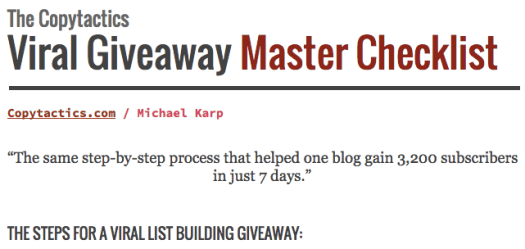
(You may remember them from my list building case study, where we were able to capture 3,200 emails in 7 days.)
The article we published is called 17 Cheap Drones for Beginners (Under $100). It’s a 2,800-word review of 17 drones that are great for new pilots.

Since the industry is starting to boom, sifting through the noise can be a struggle for beginners.
This article caters to that need.
Here are the steps I took to rank this article:
- Keyword research and competitive analysis
- Content creation and on-page SEO
- Monetize the page
- Optimize it to generate leads
- Build links to get it ranked
Let’s get started!

1. Keyword Research and Competitive Analysis
Keyword research is arguably the most important step in any SEO campaign.
Getting this right can mean the difference between loads of passive traffic or loads of wasted time.
Most people can find keywords easily. They head over to Google’s Keyword Planner, type in a few terms related to their niche, and choose a couple from the list.
Then they create content around them.
Unfortunately, these people skip a CRUCIAL step:
Competitive analysis.
I can’t tell you how many articles I’ve seen where a low-authority site is trying to rank for next-to-impossible keywords.
They put themselves up against the big guns in their industry where they have little chance of ranking on the first page.
However, if they took the extra 15 minutes to analyze their competition first, they could rank WAY faster and pull in more traffic than they otherwise would have.
Hint: This is exactly why the cheap drones article did so well.
So I can’t stress this enough:
Conduct your keyword research, but don’t forget to analyze how hard or easy it would be to rank for each keyword.
Here’s how to conduct keyword competitive analysis:
First, head over to Google’s Keyword Planner and type in a few keywords related to your niche:

Then click the Keyword Ideas tab and scroll down to the related keywords:

Sort the list by average monthly searches and look for keywords you could create content around that have a high search volume:

Add these to a spreadsheet for easy organization.
Once you’ve got your list of potential keywords to target, it’s time to analyze their competitiveness.
First, install the MozBar Chrome extension. Activate it by clicking the “M” icon in your toolbar until it turns light blue:

Then do a Google search for your first keyword.
You’ll see some cool data below each result:

MozBar shows you:
- Page Authority (PA) – Moz’s calculation for how likely a page is to rank compared to other pages.
- The # of backlinks pointing to the page.
- Domain Authority (DA) – Moz’s calculation for how likely a website (overall) is to rank compared to other pages.
Look at all of these metrics for the top ten results. You want to see pages with a low PA, DA, and number of backlinks:

If at least some of the pages have multiple low metrics (or all three) that’s the first indication that this is a low competition keyword you should go for.
Next, look at how well-optimized each search result is for the target keyword.
(This one made a huge impression on me when I first looked at this keyword.)
Look for the exact match keyword in these areas:
- Title
- URL
- Meta description

If many of the sites don’t have the exact match keyword in these areas and they have a low PA, DA, and/or number of backlinks, it’s highly likely that with a little elbow grease you could rank for this keyword and drive LOADS of organic search engine traffic.
But you’re not done yet!
Finally, visit each web page and analyze their on-page SEO.
Look at these metrics:
- Content length
- If the page contains images and/or videos
- Are they over-optimizing for the keyword?
- Are they under-optimizing for the keyword?
For the cheap drones article, many of the top ten pages had long enough content and included images and videos.
But they weren’t optimizing for the keyword correctly.
So not only were the direct ranking metrics in our favor (PA, DA, backlinks) but so were the on-page signals.
It would be criminal not to target this keyword 😉
As you go through your list of keywords, it might get cumbersome analyzing each of these metrics for tens (or hundreds) of keywords.
It definitely did for me after a while.
Luckily, I found a program that streamlined the process and helped me analyze the competitiveness for hundreds of keywords in minutes.
It’s called Long Tail Pro.

It’s a desktop keyword research tool that doubles as a rank checker and competitive analysis software.
All you do is type in a keyword:

And it pulls the keywords from Google’s Keyword Planner:

You can then click each keyword to view the top ten articles ranking for that term — including their PA, DA, number of backlinks, number of links actually passing juice, and more:

But here’s the best part:
If you click “Calculate” next to a keyword, it will calculate that keyword’s competitiveness on a scale from 1-100:


(1 being the easiest to rank for and 100 being the hardest.)
Here’s the formula they use:
Keyword Competitiveness = Page Authority +/- Domain Authority +/- Keywords in Domain Factor +/- Domain Length
It includes many of the same factors we looked at manually (within the PA, DA, and keywords in domain factor metrics).
Here’s a breakdown of the competition scale:

Anything below 40 is fairly easy to rank for.
I like to take 10 minutes, sort my list of keywords by search volume, and calculate the competitiveness for any keywords I might want to create content around.
Then I simply filter the data from highest-to-lowest competition and identify low-competition keywords with high search volume:

It takes 10 minutes and can really streamline the competitive analysis process.
However, you’d want to combine this with your own analysis to be absolutely certain it’s a keyword you want to target.
And note that there are two versions of the software: Pro and Platinum.
Platinum offers you the competition ranking for each keyword. Pro does not.
But Pro does come with the same rank checking abilities and a high-level overview of the keywords.
It has saved me a ton of time researching keywords. I use it for every campaign.
So I highly suggest grabbing a copy of Long Tail Pro right here.
After finding your low-competition keyword, you know some useful things:
- This keyword is easier to rank for.
- You know exactly what you need to do to outrank your competitors, whether it’s building more links, creating more in-depth content, optimizing your search result better, and/or including media in your content.
- You have a high likelihood of ranking for this keyword and you know the amount of traffic it could pull in.
Now it’s time to create your content:
2. Content Creation and On-Page SEO
When creating content, ask yourself this:
Does my content deserve to rank on the first page?
Google wants to deliver the best results for any given search term, so they want to move the best content for any given search term up the rankings.
While there isn’t someone at Google who will manually view your content, determine that it’s the best, and then rank it, you can increase your chances dramatically by creating content that deserves to rank on the first page.
Increase your chances of ranking by creating content that deserves to rank on the first page #SEO Share on X
Let’s use the cheap drones article as an example:
First, it’s highly relevant to the search term.
When people search for cheap drones, they’re presented with an article that reviews 17 drones you can buy for under $100.

And the drones range in price from $13.99 to $97 in order to cater to any budget within that range.
So it’s topically relevant.
Second, the article is 2,808 words long:

This tells Google that we didn’t just list 17 drones, but we elaborated on them as well. In Google’s eyes and readers’ eyes, this is more valuable.
Third, the article gives a short description of each drone and the exact features and specs from the retailer:
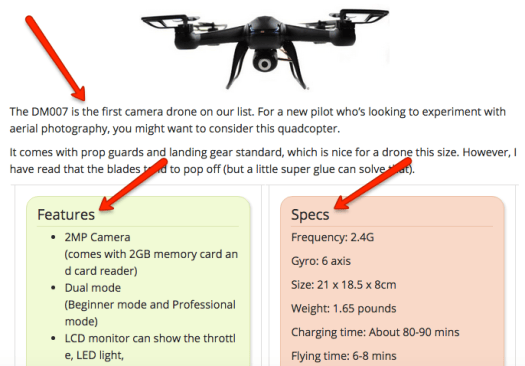
These all contain related keywords that help Google determine how relevant the page is to the target search term.
Fourth, the article links out to a sales page for each model. This increases user experience by connecting the reader to exactly what they’re looking for when they’re ready to buy.

All of this combines to create a resource that deserves to rank on the first page for this search term.
For the content you’re creating and trying to rank, look at the pages you’re competing against.
How can you outdo them?
- Can you create something that’s more in-depth? Longer-form content usually provides more value and pulls in more long-tail traffic.
- Can you enhance user experience? Maybe include videos or jump links to different sections of the page.
- Can you offer better information in general?
This will not only make your content more valuable to search engines and readers, but it will make link building and promotion easier as well.
“The more valuable your content is, the easier it is to build links to it.” #SEO Share on X
Once you’ve created your content, compare it with the top ten pages and make sure it stands out.
Then let’s optimize your on-page SEO:
How to Optimize Your Article’s On-Page SEO
On-page SEO tells Google 3 things:
- What keyword(s) you want to rank for,
- What your page is about,
- And how valuable it is.
Off-page SEO, on the other hand, tells Google how valuable other people think your page is.
Both work in tandem to help you rank in search engines. But without one or the other, your job becomes much harder.
Thankfully, because you picked a lower-competition keyword, many of your competitors probably aren’t optimizing their pages well.
This means you can get a massive leg up before you even publish your content.
Let’s go through this quick on-page SEO checklist to fully optimize your content:
- Keyword placement
- Title
- URL
- Meta description
- First 200 words
- Subheadings
- The first image’s ALT text
- A couple times in the body content
- Keyword variations
- Media
- Images
- Videos
- External linking
- Relevant resources
1) Keyword Placement
First, place your target keyword in these areas:
The title –

URL –

Meta description –

Within the first 200 words of the page –

Subheadings, where relevant.
The first image’s ALT (alternative) text –

And a couple times in the body content –

Anymore than that and you might over-optimize for the keyword, which can hurt your rankings.
Next up are variations of your keyword:
2) Keyword Variations
To make sure you’re not over-optimizing, you may want to include variations of the target keyword in your content.
These can also pull in additional search engine traffic if you end up ranking for them.
Here’s an example:

To find keyword variations, do a Google search for your target keyword and scroll down to the “Searches related to…” section.

Here, Google is practically giving you keywords they find highly relevant to your target search term.
Take any that are relevant and plug them into the Keyword Planner (or Long Tail Pro).
Add any to your content that have a decent search volume.
Then go to the Keyword Ideas tab, scroll down to the related terms, and add any to your content that seem relevant:

3) Add Media to Your Content
Media, such as images and videos, tell Google that your page is a resource with multiple dimensions.
Not only are you providing value through text, but visually as well (especially video).
Video in particular increases time-on-page, which is an engagement signal to Google. It also keeps people on your site longer to check out more content, opt in to your email list, and buy your products and services.
So make sure to include helpful images and/or videos in your content.

(We didn’t include any videos for this article, but a few drone reviews or flying examples would increase our time-on-page even further.)
4) Link Out to Relevant Resources
The pages you link out to are relevancy signals to Google.
External links also tell Google that your page is a hub of information on the web.
You don’t need to force links into your content, but you should link out to resources that cover topics your content doesn’t cater to.
For this article, we linked out to a sales page for each drone so readers could check the current price.
We also linked out to a couple reviews:

After this, your content should be fully optimized to rank for your target keyword and keyword variations.
Let’s move on to how we monetized the page:
Yours FREE: Download the 7-step process I use to drive traffic, capture emails, and rank in search engines.
3. Monetization
Since the article reviews products that can be bought online easily, and the commercial intent behind our target keyword indicates these people are ready to buy, monetizing this page became an easy decision:
Affiliate links to those products.
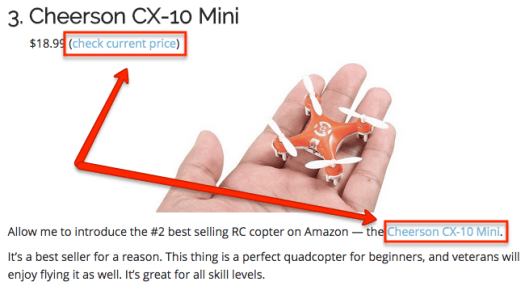
We added links to two trusted drone retailers:
- Amazon
- Banggood
Currently, the page is getting almost 8,000 affiliate link clicks per month:
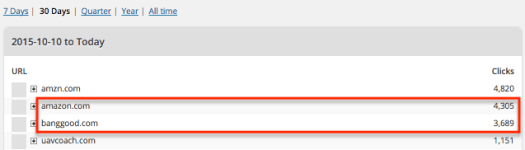
I can’t disclose the exact figures, but this translates to a healthy amount of passive income each month.
If you can’t monetize your page, don’t worry. There’s another goal that every page you’re trying to rank should have:
Build your email list.
4. Optimize Your Page to Capture Email Addresses
It’s important to do this before ranking your content.
Why?
Because you should optimize your page to generate leads before driving traffic.
This makes sure you don’t miss out on any potential leads and long-term customers.
Optimizing your page involves 3 steps:
- Create a lead magnet
- Set it up to be delivered automatically to new subscribers
- Set up opt-in forms
Let’s get to it:
1) Create a Lead Magnet
A lead magnet is simply a free resource you give away to new subscribers in exchange for their contact information.
This can be as simple as a free ebook and as extravagant as a mini-course:

When creating a lead magnet, make sure it follows this criteria:
- It can be delivered online
- It can be delivered automatically to new subscribers
- It doesn’t take that long to consume
These make great lead magnets:
- Free ebooks
- Video tutorials
- Mind maps
- Checklists
- Additional tips/strategies
- Free trials
For the cheap drones article, we created the simplest lead magnet possible:
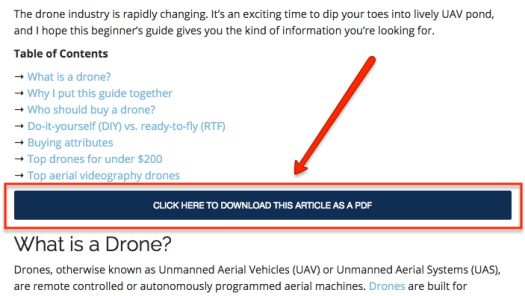
A PDF version of the article using the Print Friendly & PDF Chrome extension.

This allows people to take the article anywhere on any device, even when they’re not connected to the Internet.
(It’s a surprisingly valuable resource.)
Once you’ve got your lead magnet handy, you need to set it up so that it delivers automatically to new subscribers.
2) Deliver Your Lead Magnet Automatically to New Subscribers
This lets you generate leads and deliver what they asked for passively.
For this, you need to use an email marketing service.
Here are some of the more popular ones:
I’ve tried both Mailchimp and AWeber.
Mailchimp is one of the best free options (up to 2,000 subscribers). I used them when I first started email marketing.
But as I wanted to add more advanced features, an autoresponder, and have a cleaner interface to work with, I went with AWeber (which starts at $19/mo).
Whichever you choose, they all allow you to send a welcome email to deliver your lead magnet. Or you can redirect people to a specific page after confirming their email address.
To keep things simple, I keep all of my lead magnets on one page. When someone opts in, I automatically send them to the page where they can download the one they opted in for and any others they might be interested in.

And I give them the link again in my welcome email:

For UAV Coach, we do something similar by sending all of the lead magnets in the first welcome email.
This makes sure every subscriber gets the resource they asked for automatically.
Once your lead magnet is set up, it’s time to optimize your page with opt-in forms:
3) Optimize the Page With Opt-In Forms
For the cheap drones article, we used two opt-in forms:
1. A pop-up lightbox (using SumoMe’s free Leads app)


2. A pop-up form (using SumoMe’s free List Builder app)

Check out these instructions to install SumoMe on your site, or read my 12,000-word tutorial on lead generation for a step-by-step walk through.
These have been our two main list building strategies for the site overall.
And they’ve performed extremely well, helping us collect around 90+ emails per day (and growing):

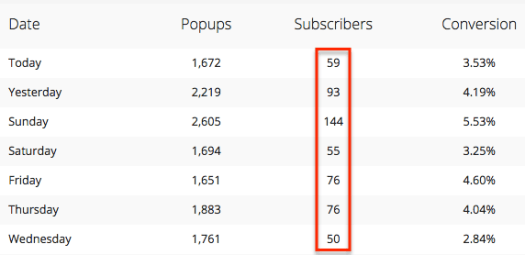

Once your page is ready to capture emails, you’re all set to build some links, get it ranked, drive traffic, build your email list, and attract a passive stream of targeted buyers.
Let’s do it!
5. Build Links to Rank Your Content on the First Page
Link building is the driving force of any SEO campaign.
Without backlinks, it’s tough to get ranked.
However, since you found a low-competition keyword, it takes a lot less links to rank on the first page than if you had picked one randomly.
This means you get to reap the rewards of targeted search engine traffic much faster than your competitors (while they continue to fight for the same handful of search terms).
To rank the cheap drones guide, we used 3 main link building strategies:
- Scoop.it
- Reverse engineering our competitor’s backlink profiles
- Guest posting
1) Submit Your Content to Scoop.it Pages
Scoop.it is a content curation platform.
People create pages around different topics then “scoop” (or share) links to valuable content they find.
The links are nofollow but a lot of these pages have solid authority and traffic:

But here’s the important part:
Most pages have a “Suggest” feature where you can suggest your content to the owner. If they like it, they’ll accept your suggestion and you’ll get the link.
All you have to do is find Scoop.it pages related to your content and suggest your article.
Here’s how:
First sign up for an account. Then search for a keyword related to your content using the top search bar:

Then click the “Topics” tab.

Click through to the first page that seems relevant and look for the Suggest box.

If it’s not there, click the back button and check out another page.
If it is there, go ahead and copy-paste your URL into the box, make sure your image/headline are correct, and click the “Suggest” button.

If the owner likes your content, they’ll accept it.
And since you created a really valuable page, chances are they will.
Keep doing this until you hit the daily limit (which is around 7).
For 5 minutes per day you could build some quality links and get initial exposure to your content.
(This is how I start every SEO campaign.)
The next link building tactic is usually my second course of action…
2) How to Reverse Engineer Your Competitor’s Backlinks
First, here’s the theory behind this strategy:
If Google thinks that a certain backlink profile is worthy of ranking a competing article on the first page, then a similar backlink profile should be worthy of ranking your content as well.
And if you had a similar backlink profile to all ten of the top pages, you would have more than a fighting chance of hitting the first page.
So this strategy is all about analyzing your competitor’s backlinks and trying to replicate the links they have.
Here’s the 3-step process:
- Grab the URLs of the top 10 pages ranking for your target keyword.
- Plug them one by one into a backlink analysis tool.
- Go through all of their backlinks and attempt to replicate them (whether they’re Scoop.it pages, weekly roundups, resource pages, blog comments, guest posts, etc).
It’s a great way to get an inside look at how your competitors are building links and how you can do the same.
Let’s reverse engineer your competitor’s rankings:
First, grab the URLs of the top 10 pages ranking for your target keyword.
Then choose a backlink analysis tool that will pull up all of the links pointing to each page.
There are a ton to choose from, but here are some of the most popular ones:
Ahrefs, Majestic SEO, and Open Site Explorer are all monthly subscription services, but they each let you pull a certain number of backlinks from each URL for free.
So go to each one, plug in your URLs one-by-one, and collect the backlinks they give you.
Then check out SEO Spyglass.
SEO Spyglass is my #1 choice, because it’s a desktop software with a one-time fee.

The free trial also lets you pull up to 1,100 backlinks at a time, which is many more than the other top backlink checkers.
To check the backlink profiles of individual pages, the 1,100 link limit is more than enough.
But you will probably need the paid version to pull backlinks for entire domains.

(Or if you want to export the data, which is only available in the paid version.)
Once you’ve chosen a backlink checker, go ahead and plug in the first URL:

When it’s done analyzing, you will have a list of backlinks pointing to the page:

SEO Spyglass shows you PR, PA, DA, if the links are followed vs nofollow, and a bunch other metrics to help you analyze the quality of each link you try to build.
To get the most out of your time, I suggest sorting the data by PR (PageRank) and going for the highest PR links first:

Then put them into a spreadsheet like this:

Here’s a Google spreadsheet you can model off of.
Visit each link and try to replicate it:
- If it’s a guest post, submit a post to the site with a link to your content
- If it’s in a comment, join the discussion and leave a link to your content
- If it’s in a forum, join the forum and leave a link back
- If it’s a directory, submit your article
- If it’s a resource page, reach out to be included
However they’re building links, try to replicate as many as possible.
For the cheap drones article, I analyzed the backlinks of the top ten pages, found as many quality link opportunities as possible, and built links back to the article, like so:

(DA76.)
These links can also send you a good amount of referral traffic as well:

Keep doing this for each of the articles ranking for your target keyword.
3) Guest Post on Relevant Sites in Your Niche
This was the final link building strategy we used, and it got us some of our best links.
The best links you can get are within the body content of a page that’s topically related to the one you’re trying to rank.
If you write guest posts for other sites and leave a link back to your content, you get to control the page’s topic, link placement, and anchor text.
In theory, it’s a step below private blog network links.
So no, guest posting is not dead. Far from it, actually.
They’re some of the best links you can get.
Here’s how to use guest posting to build backlinks:
First, use these search strings to find guest post opportunities in your niche:
Your niche + write for us
Your niche + contribute
Your niche + guest post
Your niche + accept guest post
Your niche + guest article
Your niche + guest post by
This should bring up a list of guest post opportunities:

Click through to each one and look for instructions to pitch a guest article.
If you don’t find any, send them each an email like this:
Hey ,
First off, I just want to say how much I enjoy reading your articles over at . I always get a ton of value from them.
I noticed that you accept guest posts, so I thought I would reach out.
Here’s some of my previously published content, to give you a feel for my writing style and quality:
Article #1
Article #2
Article #3
And here are some ideas your readers might like:
Idea #1
Idea #2
Idea #3
If you would prefer different topics, I would be happy to discuss it with you.
Anyway, keep up the good work!
Cheers,
For the sites that accept your guest post, simply write the article and make it as valuable as possible.
Then either ask them if you can include a link back to your site, or just be a rebel and include it and see if they say anything when you send over the post.
Even if the site has a no-backlink policy, they’ll often overlook it if your article is valuable enough.
And don’t forget to think about the anchor text you’re using.
For the cheap drones article, I went heavy on keyword-focused anchor text:


This propelled our article to the first page quickly.
But also note that over-optimized anchor text can hurt your rankings.
So look at your overall anchor text distribution and decide whether keyword-focused or more generic anchor text would be best.
And you’re done!
Guest posts are great for building links to your content, but you also get the added benefit of driving traffic to back to your site and exposing your expertise to a new audience.
These links gave our article the final push to the first page and the search engine traffic we enjoy today.
The Success of This SEO Campaign
This campaign was successful because all of the right steps were taken accordingly:
- We found a low-competition, high-volume keyword
- We created an amazing piece of content that’s relevant to the search term and deserves to rank on the first page
- We optimized our on-page SEO correctly, and we did it better than our competitors
- We made sure the page was ready to capture emails before driving traffic
- We built links to the page in order to get it ranked
To date, the article has gotten 54,206 visits from search engines and is the most visited page on the site:


Since then, we’ve followed a similar process to cost effectively rank other pages and grow the site’s traffic exponentially.
If you haven’t already, check out a convenient infographic and explanation of the full 7-step process I use right here:
Yours FREE: Download the 7-step process I use to drive traffic, capture emails, and rank in search engines.
Now it’s your turn:
Take this information, run a similar SEO campaign, and let me how it goes in the comments below.
Cost Effective #SEO: How I Drove 34,000 Search Engine Visits in 60 Days (For Free) Share on X
What did you think of this case study? Comments, suggestions, questions, or insights?
Join the discussion below: