Tips To Perform In-Depth Technical SEO Audit In 2021

Image Credits

An SEO audit should be a comprehensive process that should entail best practices and cover both content and structural components that affect your website’s SEO. This is where you need professional assistance and expert guidance in order to view the bigger picture.

At the same time, attention to minor details should never be forgone, and any discrepancies should be addressed immediately.  As a business owner, you need an SEO audit that covers everything related to your website’s performance and the competition.

According to a recent study by WebFX, more than 50% of all website traffic is driven through organic means which is more than both paid and social combined. Furthermore, around 25% of all internet users browse the web with an ad blocker, while 70% consider that ads intrude on their browsing experiences. 

However, at the same time, 70% of internet users prefer personalized ads related to their interests. But most importantly, organic traffic has been observed to capture more than 40% of revenues for numerous companies. 

In light of this information, let’s take a quick look at some of the ways through which you can expediently perform an in-depth technical SEO audit.   

1. 404 Pages

Image Credits

Bad user experience is perhaps the single and most powerful feedback that can turn away your customers for good. Plus this means that not only are they not coming back but they will more likely switch to a competitor, ouch! There are various tools that can help you find 404 pages on your website that report a broken or a missing link. These include:

  • 404 Redirected Plugin for WordPress (only)
  • Google Webmaster Tools
  • Screaming Frog
  • Xenu’s Link Sleuth

Plus you can also consider making 404 interactive by adding links, customizing them, adding a search bar, putting your sitemap, and promoting your company and brand image. 

2. Analytics to Compare Site Metrics
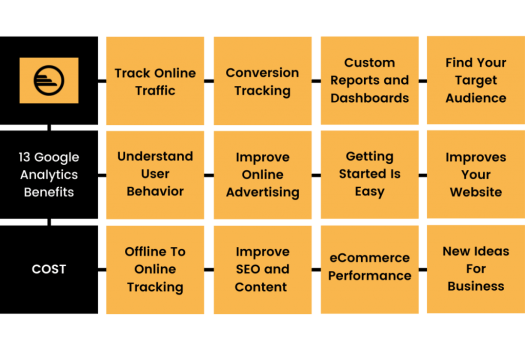
Image Credits

Analytics of your website are the bread and butter for your website. Their study can offer you deep insights as to the problems your website is facing and how you can resolve them. Some of the best tools include:

  • Ahrefs
  • Crazy Egg
  • Google Analytics
  • Moz Pro
  • SEMRush

3. Check Internal Links

Image Credits

Your internal links help create link juice and also offer your users with easy navigation throughout your website. This is why it is a must that your internal links are working correctly and linking to the correct pages. SEO Review Tools offers an Internal Link Analyzer Tool, and you can find various other services online too. 

4. Duplicate Content

Duplicate content can be troublesome for search engines as when they crawl sites it can often pose a difficulty of which version of the content to include or exclude from being indexed.

This can also affect link metrics such as authority, link equity, trust, etc., to a page or whether to keep it separated for each version. Some viable solutions to this include:

  • Using 301 redirects from the duplicate content to the original content. This will help crawlers know which page has the originally intended content and thus help rank the correct page.
  • Another way is to use the Rel=”canonical” attribute. This will allows search engines to understand which specified URL needs to be provided with the ‘ranking power’. 
  • You can also use Meta Robots Noindex, commonly called Meta Noindex,Follow and otherwise in technical terminology is known as content=”noindex,follow”. 

5. Implementation of Pagination

Pagination should be considered an important element for those websites that do not apply the infinite scroll feature for their pages.

Pagination allows finding individual pages easily and also aids them to be bookmarked. Website owners use pagination to reduce loading times, improve customer experiences, and cashing-in on advertising revenues. According to critics, best practices include:

  • Using first and last links where applicable
  • Providing previous and next links
  • Spacing out page links for better user-visibility
  • Providing large clickable areas for ease of use

6. Pages Missing Google Analytics Code

Image Credits

Google’s Analytics Code allows you to track the performance of your website, landing & service pages, and much more. This code can measure the ROI (Return on Investment) for various media and content used on your website. 

This can also include Flash applications, social networking sites, and videos that you post. Hence you need to check for pages that do not have the Google Analytics Code running on them. Services like GA Checker by Data Rocks can help you determine these problems to make corrections or manually check your website if it’s not too big for you to handle. 

7. Review Sitemap

Image Credits

Your XML sitemap serves as a roadmap to search engines. It also donated the URLs within your websites. 

This is why checking and reviewing your sitemap is vital as it can help you in preventing incorrect URLs from being crawled. If that happens, then it can damage your SEO and rankings. Hence it would help if you always took care that search engines never indexed incorrect pages. 

Plus reviewing your sitemap can also help you from avoiding important URLs of your website from being missed. At Crowd Writer, website development team makes sure that sitemaps are fully functional and error-free. Some of the best sitemap tools include:

  • InSpyder
  • Sitemap Writer Pro
  • Slick Plan
  • WriteMaps

8. Schema & Structured Data

Image Credits

Schema markup is also known as structured data and it represents a particular code that you can use to make search engines crawl your website and display your content on SERPs (search engine result pages). 

The benefits of using structure data include being featured by search engines when they resolve a search or query, gain more real estate on SERPs, and improve CTRs (click-through ratios). Here are some tools that you can use to strengthen schema markup for your websites.

  • Google’s Structured Data Markup Helper and Data Highlighter
  • Schema Markup Generator by Merkle
  • Schema Pro

9. Test Site Speed

Image Credits

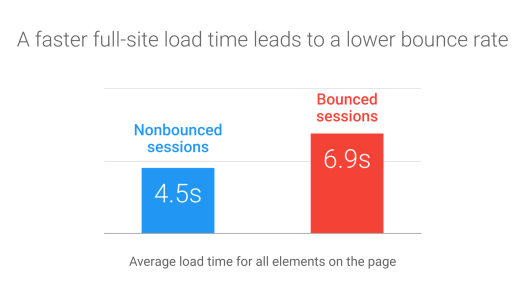
Site speed matters because it directly affects user experience. Sites that take longer to load are often observed to have higher bounce rates, and that can never be good for your website’s SEO.

There are various means to appropriately improve your website speed, such as performing Image SEO and utilizing CDNs (content delivery networks). Additionally, you can also use various tools to test your website’s loading speed, such as:

  • Google Analytics Site Speed
  • Google Mobile Website Speed Testing Tool
  • Google PageSpeed Insights 

Conclusion 

SEO audits are mandatory if you want to analyze your website’s performance effectively, and they should be carried out periodically. However, they should not be rushed and provided their due time, which can be anywhere from 2-6 weeks depending on your operations’ size and scope. 

Ideally, SEO audits should be carried out every year, but every 3-6 months should be considered for highly competitive markets and industries. While SEO audits can be an exhausting ordeal, they can help you to rejuvenate your business strategies and bring about immense improvements in your performance online.    

Author Bio:

Amanda Jerelyn currently works as a Content Executive at Dissertation Assistance. This is where higher education students can acquire professional assignment help UK from experts specializing in their field of study. During her free time, she likes to doodle and create wall art. 

The Changing Nature of SEO

About the Author: Amit is an SEO expert based in the UK, who specializes in white hat link building for medium to large sized businesses. Learn more about Amit at - http://www.amitdigitalmarketing.com/

SEO rewards websites that are at the top of search rankings with the lion’s share of visitors searching for that particular keyword. In an effort to get to number 1, some companies resort to using shady SEO techniques such as stuffing their content full of keywords, over-optimization, etc.

It’s an unfair practice, but Google finally took notice and updated their algorithm. In an instant, all high-ranking sites that put too much emphasis on keywords lost their spot overnight. It goes without saying that SEO has certainly evolved from having the most number of keywords to that of actually providing useful content to the audience.

Here’s how you can change with the times and optimize your site and your links in order to survive the changing nature of SEO:

No To Keyword Stuffing

Before, being consistent in stuffing your articles with the keyword you want to rank for on each paragraph used to give you ranking results, but today that’s a big no-no.

Let’s face it. Content that’s been made this way doesn’t make for good reading. The keywords are awkward in themselves no matter where you place it, and Google’s technology is becoming smart.

Enter RankBrain, a kind of extremely intelligent algorithm created to detect unnaturally-placed anchor text. It takes a quick look at how the keywords are being used. For example, let’s say a piece has a single keyword scattered multiple times in an article, and that keyword is linked to a number of different sites. RankBrain determines that it’s unnatural, and therefore penalizes the site.

Bottom line is, keyword stuffing has gone the way of the dinosaurs as far as SEO is concerned. Google has recognized the power of keywords, and took it away in favor of actual content. You may say that you’re not really stuffing, and that you make sure that the keyword doesn’t exceed 2%, but how far will this strategy get you?

Let’s make this clear- multiple keyword occurrences will no longer have any bearing on search engine rankings whatsoever.

This is a game-changing mechanic that requires a bit of an explanation, but hear me out here. Before, anyone could put in as many keyword as possible to rank on the Google search engine. Google saw this exploit and shut it down. In fact, this strategy no longer works in as far as a few years ago, but somehow gurus are still preaching it. SEO “experts” still claim it has the power to rank you up high when you hit a certain percentage. But when you look at the actual content, you’ll see that quality is compromised and that the whole thing reads awkward.

Duplicate content, paying for mass submission on directories and sites and posting in forums are out the window as well.

So, what else is there?

Yes To Great Content

They say content is king when it comes to SEO, and that is still as relevant as ever. It’s the foundation that you should build up your whole SEO strategy with because it’s the key to long-term success!

The best way to go about crafting your SEO strategy is to invest in good content creation. Keep in mind that the less you pay for content, the lower its quality will be. It makes total sense- why would a write invest so much time doing research and write a truly engaging piece when you’re paying just a few bucks?

Plus, anyone who sees that poorly-written content will just as likely leave and go somewhere else.

White Hat SEO is the better alternative to Black Hat SEO. Granted, it takes longer but the reward will be worth it. It’s Google-approved, so you can be sure that it will stand the test of time (and algorithm updates).

A writer who knows the topic will know the relevant keywords to include in the article. The more relatable phrases in a piece of content, the more RankBrain sees as relevant. That website will be propelled up the ranks sooner or later.

Here’s what you should do- think of the reader when crafting your article. It should be relevant, engaging and provide value to those who will read it. Couple that with solid link building strategies and you’ll soon rank for the most relevant keywords and associated phrases. It’s simple, easy and you won’t have to calculate keyword percentages, analyze key phrases or do keyword stuffing.

How PDF is Better Than Other Formats

Guest Contribution: This article was written by a guest author. If you would like to contribute to Copytactics, please feel free to get in touch.

If you have to edit a text file, you are going to have to choose between multiple good and reliant formats.

However, there’s a big difference between being reliant and being the best option available. The latter description best fits the PDF format which has the upper hand on other formats such as .DOC.

If you don’t have that much experience with text editing formats or with PDF in general, that statement might be a bit questionable. However, we have prepared an enticing list of features that put PDF on top. By the end of this article you might find yourself using PDF instead of your current format.

Combining files and content

Combining files is most natural in the PDF format. It is the format used in professional environments such as publications. Editors use PDF files to combine all the content they need to review, and it makes things a lot easier.

The easy with which text and graphics can merge also comes into play and makes the PDF format the best solution for when you need to combine multiple documents and make it look as natural as possible.

It’s also very easy to learn how to combine multiple files, so it’s definitely a feature anyone can get into using early on.

Protecting files with a password

This is a feature that is very welcomed in many situations. Having unsecured files just sitting on your computer is an open invitation for anyone to just sneak in and read them when you’re on your break at work or when you’re not at your computer at home.

No matter what kind of information you want to protect, you can use PDFs to put a password on the document. This will ensure no one can just drop by and read your sensitive information.

Universal availability

Other formats like the aforementioned .DOC require associated software, i.e. Microsoft’s Word program. If you have to have certain software installed to view or manipulate a file, that cuts the amount of people that can read the documents you send them considerably.

If you want to make absolute sure that whomever you send a file to is capable of reading it, send a PDF. PDFs can be opened with a plethora of PDF reading software but also with the Chrome browser which means that the recipient will have no problem in reading the file.

Small size

PDF files generally occupy a lot less space on the hard drive than any other similar format. Considering the fact that you can also use imagery and integrate it into a PDF file (see digital magazine issues for instance), the size of the file should be considerably bigger.

But it manages to maintain a very favorable total size which is great news for your internal storage.